
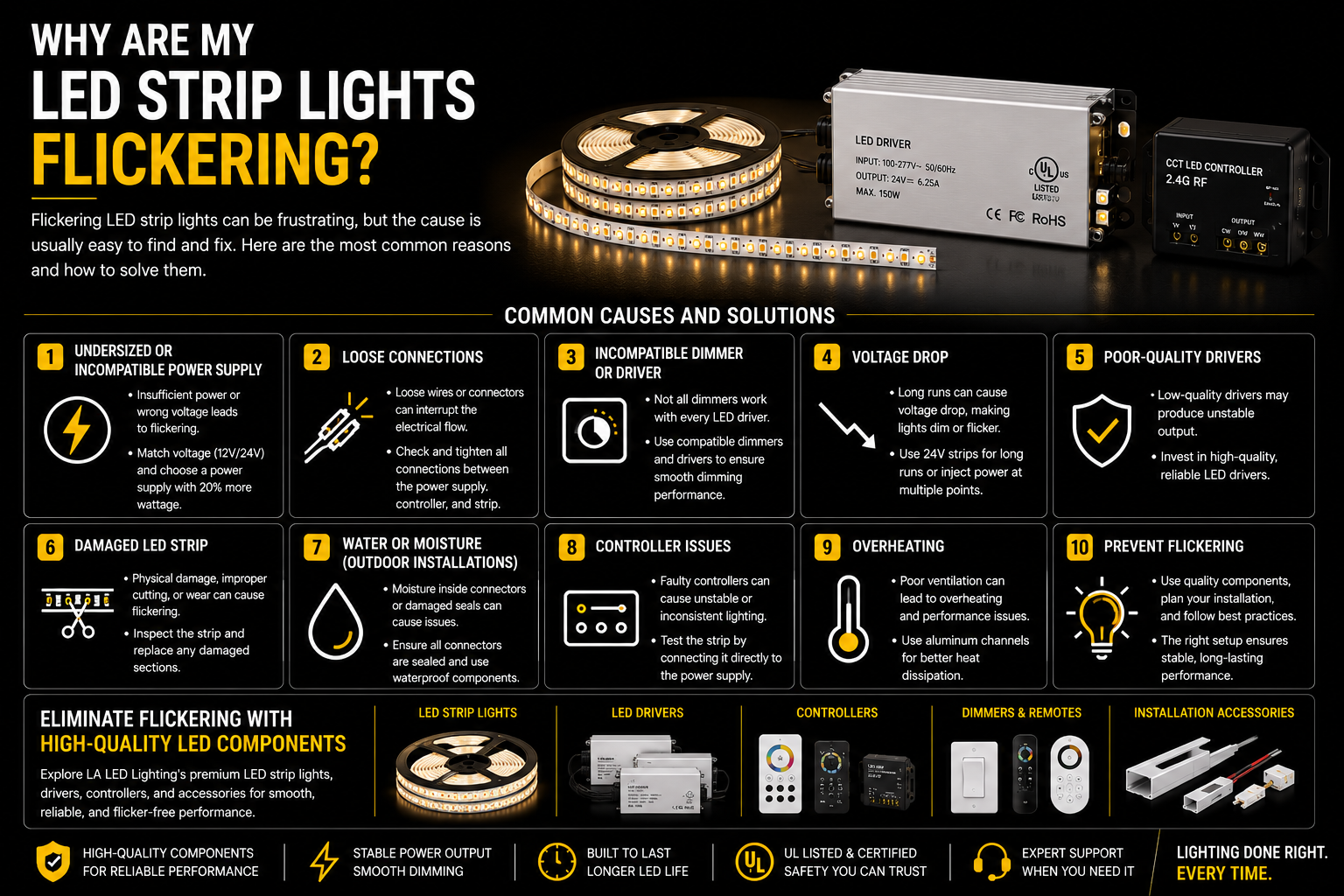
LED strip lights are one of the most reliable and energy-efficient lighting solutions available today. However, if your LED strip lights begin flickering, flashing, or blinking unexpectedly, it can quickly become frustrating. Fortunately, most flickering problems are easy to identify and fix.
Whether you've recently installed new LED strip lights or have been using them for years, understanding the possible causes of flickering can help you restore smooth, consistent lighting and prevent future issues.
One of the most common causes of flickering is an incompatible or undersized power supply. Every LED strip requires a specific voltage and enough wattage to operate properly. If the power supply cannot deliver enough power, the LEDs may flicker, dim, or shut off intermittently.
Before installing LED strip lights, always verify that your power supply matches the strip's voltage, whether it's 12V or 24V, and provides at least 20% more wattage than the total power consumption of the strip. A driver such as the 100W 5-in-1 Dimmable LED Driver can be set to either voltage and leaves roughly 80W of comfortable working capacity.
Loose electrical connections are another frequent cause of flickering. Even a slightly loose connector, terminal, or wire can interrupt the electrical flow and cause the lights to blink unexpectedly. Check every connection between the power supply, controller, connectors, and LED strip to ensure everything is secure.
Using a dimmer that isn't compatible with your LED driver can also create flickering. Not all dimmers work with every LED driver, especially when using low-voltage LED strip lights. If your lights only flicker while dimming, the dimmer or driver is often the source of the problem. Choosing a driver that accepts TRIAC, ELV, MLV, 0-10V, and PWM control, such as the 200W 5-in-1 Dimmable LED Driver, removes protocol mismatch as a possible cause.
Long LED strip runs may also experience voltage drop. As electricity travels through a long strip, voltage gradually decreases, causing sections farther from the power supply to appear dimmer or flicker. Choosing 24V LED strip lights for longer installations or powering the strip from multiple points can help eliminate this issue. The Indoor Dotless COB LED Strip (10mm, 24V) is a 24V product that holds brightness more evenly across longer runs.
Poor-quality LED drivers or power supplies are another common reason for unstable lighting. Low-quality components may produce inconsistent voltage output, resulting in visible flickering even when the LED strip itself is functioning correctly. Investing in a high-quality LED driver improves both performance and long-term reliability.
Damaged LED strips can also cause flickering. Physical damage, excessive bending, water exposure, or improper cutting may interrupt the circuit and create inconsistent operation. Carefully inspect the strip for damaged sections or burnt components.
If you're using waterproof LED strip lights outdoors, check for moisture inside connectors or damaged waterproof seals. Water intrusion can affect electrical connections and cause intermittent flickering. Outdoor and damp-location systems should also use a sealed driver such as the 96W Dimmable LED Transformer (24V, IP65) rather than an indoor-rated unit in a protected box.
Controller issues should not be overlooked. RGB, RGBW, and smart LED controllers occasionally develop communication or output problems that result in unstable lighting. If possible, test the strip by connecting it directly to the power supply to determine whether the controller is causing the issue. If the controller turns out to be the fault, the MiBoxer WL5 WiFi 5-in-1 LED Controller (12-48V) handles single color, CCT, RGB, RGBW, and RGB+CCT strips from one unit.
Heat is another factor that can reduce LED performance. Although LED strip lights produce less heat than traditional lighting, inadequate ventilation or installation in enclosed spaces without proper heat dissipation can shorten component life and contribute to performance issues. Aluminum LED channels not only improve appearance but also help dissipate heat and extend the lifespan of LED strips.
Preventing flickering starts with choosing quality components. Matching the correct voltage, selecting a properly sized power supply, using compatible dimmers and controllers, and installing LED strips carefully can prevent most lighting problems before they occur.
If your LED strip lights continue flickering after checking these common issues, replacing the power supply or testing the strip with another compatible driver is often the fastest way to identify the source of the problem.
With proper installation and high-quality components, LED strip lights should provide years of smooth, reliable, and flicker-free illumination for your home or commercial space.
FAQ
Why are my LED strip lights flickering after installation?
The most common causes are an undersized power supply, loose wiring, incompatible dimmers, or incorrect voltage.
Can a bad power supply cause LED strip lights to flicker?
Yes. An unstable or overloaded power supply is one of the leading causes of flickering.
Why do my LED strip lights flicker when dimmed?
This usually indicates that the dimmer is not compatible with the LED driver or power supply.
Can voltage drop cause flickering?
Yes. Long LED strip runs may experience voltage drop, especially with 12V systems. Using 24V strips or injecting power at multiple points can help solve this issue.
How can I stop my LED strip lights from flickering?
Check all electrical connections, verify the correct voltage, use a properly sized power supply, and ensure your dimmer and controller are compatible with your LED strip.
Eliminate Flickering with High-Quality LED Components
Reliable lighting starts with quality products. Explore our COB LED strip lights and 0-10V dimmable LED drivers, along with smart controllers and installation accessories designed for smooth, flicker-free performance.