
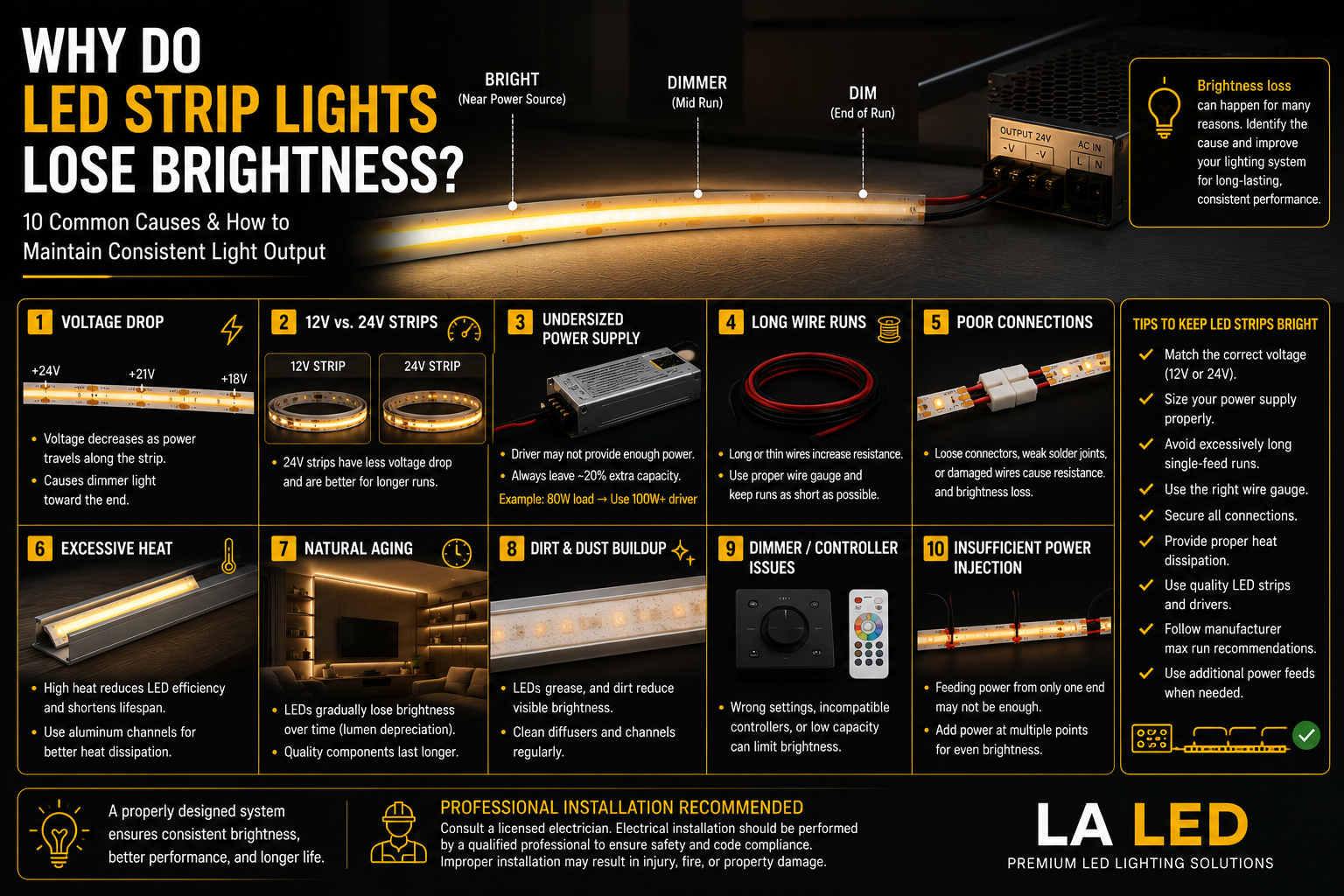
LED strip lights are designed to provide efficient, consistent, and long-lasting illumination. But sometimes you may notice that your strips aren't as bright as they used to be—or that one end of the strip looks noticeably dimmer than the other.
So, why do LED strip lights lose brightness?
There isn't just one possible cause. Voltage drop, excessive heat, an undersized power supply, poor connections, long strip runs, and normal LED aging can all affect brightness.
Understanding the difference between these issues can help you identify the problem and improve the performance of your LED lighting system.
1. Voltage Drop Along Long LED Strip Runs
Voltage drop is one of the most common reasons an LED strip becomes dimmer toward the end of a long run.
As electrical current travels through the strip and wiring, some voltage is lost because of electrical resistance. The longer the run, the more noticeable this effect can become.
You may notice:
- Strong brightness near the power source
- Gradually reduced brightness farther down the strip
- Uneven illumination
- Color changes in RGB or RGBW strips
This doesn't necessarily mean the LEDs are defective. It may simply mean the installation needs a better power distribution design.
2. 12V vs. 24V LED Strips
For longer installations, 24V LED strips generally experience less voltage drop than comparable 12V systems.
That's one reason 24V strips are commonly selected for longer under-cabinet, cove, architectural, and commercial installations.
However, voltage alone doesn't determine maximum run length. Strip wattage, circuit design, wire size, and manufacturer specifications also matter.
Always match the LED strip with a power supply of the correct voltage.
3. The LED Driver May Be Undersized
Your LED driver or power supply must provide enough wattage for the entire connected load.
For example, if your strips require 90 watts but they're connected to a driver that's too small, the system may experience unstable or reduced performance.
A common design guideline is to leave approximately 20% capacity rather than continuously operating the driver at its maximum rating.
For example:
Total LED Load: 80W
Suggested Driver Capacity: 100W or greater
The exact sizing should always follow the specifications of the LED strip and driver being used.
4. Long Wire Runs Can Also Cause Voltage Drop
The LED strip isn't the only place where voltage can be lost.
Long wires between the driver and LED strip can also introduce resistance, particularly when the wire gauge is too small for the current and distance involved.
For larger projects, proper wire sizing and thoughtful placement of the power supply can make a significant difference.
5. Poor or Loose Connections
Connectors and wiring connections can affect brightness as well.
Loose terminals, poorly fitted connectors, damaged wires, or weak solder joints can increase electrical resistance and reduce the amount of power reaching the LED strip.
If one section suddenly becomes dimmer, inspect connections before assuming the strip itself has failed.
6. Excessive Heat
Heat is one of the biggest enemies of LEDs.
Although LEDs are energy-efficient, they still generate heat during operation. If that heat can't dissipate effectively, elevated operating temperatures can accelerate lumen depreciation and reduce the life of the LEDs and other components.
Installing LED strips inside appropriate aluminum channels can help dissipate heat while also providing a cleaner finished appearance.
Avoid installing high-output strips in tightly enclosed spaces unless adequate thermal management is provided.
7. LEDs Naturally Become Dimmer Over Time
Like virtually every light source, LEDs don't maintain exactly the same brightness forever.
Instead of suddenly burning out in many cases, LEDs gradually experience lumen depreciation over their operating life.
The rate depends on factors such as:
- LED quality
- Operating temperature
- Drive current
- Hours of operation
- Power supply quality
- Installation environment
High-quality components and proper thermal management can help maintain useful light output for longer.
8. Dirt and Dust Can Reduce Perceived Brightness
Sometimes the LEDs haven't actually lost much output.
Dust, grease, and other contaminants can accumulate on the strip, diffuser, or aluminum channel cover and reduce the amount of visible light reaching the room.
This can be particularly noticeable with under-cabinet lighting in kitchens.
Cleaning accessible diffusers according to the manufacturer's instructions may restore some of the apparent brightness.
9. Dimming or Controller Problems
If you're using a dimmer, RGB/RGBW controller, CCT controller, or smart lighting system, the control equipment can also affect light output.
An incompatible or malfunctioning controller may prevent the LED strip from reaching full brightness.
If brightness changes unexpectedly, check:
- Dimmer settings
- Controller settings
- Controller capacity
- Driver compatibility
- Wiring connections
Every component in the system needs to work together correctly.
10. Power Injection May Help Long Installations
For long LED strip installations, supplying power from only one end may not provide uniform brightness across the entire run.
Depending on the product and installation, power may need to be supplied at additional points to reduce voltage drop.
This technique is often referred to as power injection.
The appropriate method depends on the strip specifications, total load, wiring, and project design. Larger installations should be planned by a qualified professional.
How to Keep LED Strip Lights Bright
Good system design can prevent many brightness problems.
For reliable performance:
- Match the strip and driver voltage.
- Size the LED driver correctly.
- Avoid excessively long single-feed runs.
- Use appropriate wiring.
- Keep electrical connections secure.
- Provide adequate heat dissipation.
- Use quality LED strips and drivers.
- Follow manufacturer maximum-run recommendations.
- Use additional power feeds when the system design requires them.
The goal isn't simply to make the LEDs brighter. It's to deliver the correct voltage and current throughout the installation while keeping the components operating within their intended limits.
Final Thoughts
If your LED strip lights are losing brightness, first determine where and when the brightness loss occurs.
If the strip is bright near the power source but dim at the far end, voltage drop is a likely cause. If the entire installation is dim or unstable, check the driver, controller, wiring, and connections. If an older installation has gradually become dimmer over several years, normal lumen depreciation or prolonged heat exposure may be contributing.
A properly designed system using quality LED strips, correctly sized drivers, suitable wiring, and effective heat management can provide consistent and reliable illumination for years.
FAQ
Why is my LED strip brighter at one end than the other?
Voltage drop is a common cause. As the distance from the power source increases, electrical resistance can reduce the voltage available farther along the strip.
Do LED strip lights become dimmer as they age?
Yes. LEDs gradually lose some light output over their operating life. Excessive heat can accelerate this process.
Are 24V LED strips better for long runs?
24V LED strips generally experience less voltage drop than comparable 12V systems, making them a popular option for longer installations.
Can an undersized LED driver make LED strips dim?
Yes. A driver that can't adequately support the connected load can contribute to poor or unstable lighting performance.
Can aluminum channels help LED strips last longer?
Aluminum channels can help dissipate heat from LED strips. Proper thermal management can support more consistent performance and longer component life.
Why did my LED strip suddenly become dim?
Check the driver, wiring, connectors, controller, and dimmer first. A sudden brightness change is more likely to indicate a system or connection issue than normal LED aging.