
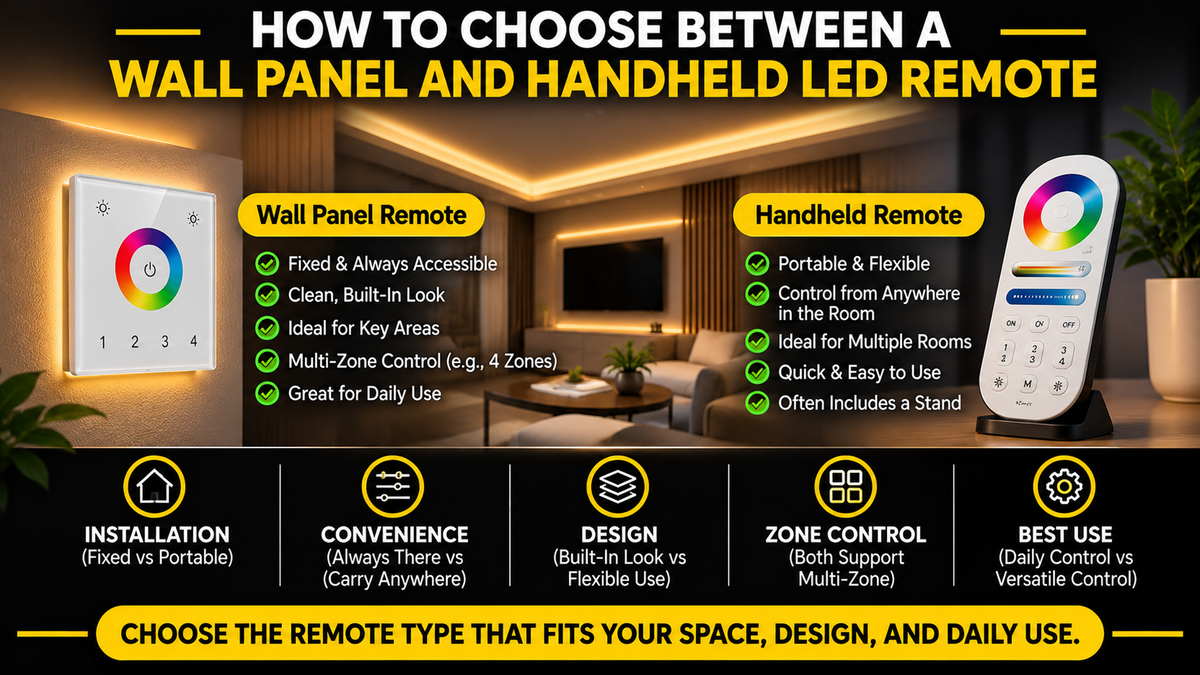
How to Choose Between a Wall Panel and Handheld LED Remote
Choosing the right LED strip is only part of creating a successful lighting system.
The way you control your lights can have just as much influence on your everyday experience.
For example, imagine installing beautiful warm white COB LED strips under your kitchen cabinets. The lighting looks excellent, but every time you want to adjust the brightness, you need to search for a misplaced remote.
Alternatively, imagine installing a wall-mounted control panel in a room where you frequently change lighting colors from your sofa. Walking across the room every time you want to make an adjustment may become inconvenient.
These situations illustrate why choosing between a wall panel and a handheld LED remote matters.
Both options can provide convenient lighting control, but they are designed for different user preferences and installation requirements.
In this guide, we'll compare their advantages, limitations, installation considerations, multi-zone capabilities, and compatibility with different LED strip systems.
By the end, you'll know which option makes more sense for your residential or commercial lighting project.
Our controllers and remotes range includes both: two wall panels and four handheld remotes, all from the same MiBoxer family so they pair with the same receivers.
1. What Is an LED Wall Control Panel?
An LED wall control panel is a lighting control device designed to remain in a fixed position, usually mounted on a wall.
Depending on the model, it may use:
Touch-sensitive controls
Physical buttons
Rotary adjustment
A color wheel
Brightness sliders
Dedicated zone-selection buttons
Some wall panels communicate wirelessly with compatible LED receivers, while others require wired connections.
What Can a Wall Panel Control?
Depending on its specifications, a wall panel may support:
Turning LED lights on and off
Adjusting brightness
Changing RGB colors
Adjusting warm white and cool white balance
Selecting lighting zones
Activating preset scenes
Controlling compatible receivers
Not every wall panel offers all these features.
Common Applications
Wall-mounted LED panels are often used in:
Kitchens
Living rooms
Bedrooms
Hotels
Restaurants
Offices
Retail stores
Conference rooms
Their main advantage is providing a permanent, predictable location for lighting control.
We carry two, both 4-zone and both 2.4GHz RF: the B3 RGBW touch panel and the B1-B single-colour panel in black.
2. What Is a Handheld LED Remote?
A handheld LED remote is a portable control device that communicates with a compatible LED receiver or controller.
Many modern LED remotes use radio-frequency communication, although infrared and other communication technologies are also available.
Common Features
Depending on the model, a handheld remote may provide:
On/off control
Brightness adjustment
RGB color selection
Color temperature adjustment
Multi-zone selection
Scene or mode selection
Speed adjustment for supported dynamic effects
Common Applications
Handheld LED remotes are popular for:
Living rooms
Bedrooms
Home theaters
TV backlighting
Decorative COB LED strips
Entertainment areas
Furniture lighting
Small commercial installations
Their main advantage is portable lighting control from different positions within the room.
Our handhelds are the FUT092 for RGB+CCT, the FUT096 for RGBW and the FUT007 for CCT, all 4-zone, plus the C8-B at 8 zones.
3. Wall Panel vs Handheld LED Remote: Key Differences
| Feature | LED Wall Panel | Handheld LED Remote |
|---|---|---|
| Control location | Fixed on a wall | Portable |
| Everyday accessibility | Always in the same place | Available wherever carried |
| Installation | May require mounting or wiring | Usually minimal physical installation |
| Power source | Model-dependent | Commonly battery-powered |
| Risk of misplacing | Low | Higher |
| Control from a sofa | Less convenient unless nearby | Very convenient |
| Multi-zone capability | Available on selected models | Available on selected models |
| RGB and CCT control | Model-dependent | Model-dependent |
| Commercial suitability | Excellent for shared spaces | Useful for staff or flexible control |
| Appearance | Integrated into room design | Portable accessory |
| Replacement | May require mounting work | Often straightforward |
| Receiver compatibility | Must be verified | Must be verified |
Important: A wall panel is not automatically more powerful or technologically advanced than a handheld remote. Actual functionality depends on the specific model and compatible LED control system.
Two rows of that table resolve differently for our range than the general case. Both our wall panels are battery-powered and wireless, so the "installation" and "power source" rows involve mounting but no control wiring. And on the RGB and CCT row, our panels cover RGBW (B3) and single colour (B1-B), while RGB+CCT and CCT are handheld-only — the FUT092 and FUT007. If your lighting type is tunable white or RGB+CCT and you specifically want a wall panel, that is worth knowing before you plan the installation.
4. When Is a Wall Panel the Better Choice?
A. When You Want a Permanent Control Location
One of the biggest advantages of a wall panel is consistency.
Everyone knows where to find the controls.
This is especially helpful in shared environments such as:
Family kitchens
Offices
Hotel rooms
Restaurants
Meeting rooms
Retail stores
There is no need to search for a remote before adjusting the lighting.
Example
A kitchen has several sections of under-cabinet COB LED lighting.
A wall panel near the entrance allows anyone entering the kitchen to turn on the lights or adjust brightness.
For frequently used lighting, this can be more convenient than a portable remote.
For that exact case — single-colour under-cabinet lighting such as the 10mm Indoor Dotless COB — the B1-B panel with a FUT036S receiver is the simplest system we sell: on, off and brightness across four zones, with nothing to lose.
B. When Multiple People Use the Same Lighting System
A wall panel is particularly practical when several people need access to lighting controls.
In an office or commercial space, a handheld remote may be left on a desk, moved to another room, or misplaced.
A fixed panel avoids this problem.
Best Applications
Shared offices
Conference rooms
Hotel suites
Restaurants
Commercial reception areas
Family living spaces
Recommendation: Consider a wall panel when the lighting system needs to be accessible to multiple users throughout the day.
C. When You Want a Clean, Integrated Appearance
Wall panels can become part of the interior design.
A well-positioned panel provides a more permanent appearance than a loose remote sitting on a table.
Depending on the model, wall panels may feature:
Black or white finishes
Minimalist touch surfaces
Glass-like front panels
Illuminated controls
Compact wall-mounted designs
Design Consideration
Match the panel's appearance with the room's other electrical accessories, such as wall switches and dimmers.
This helps maintain a consistent visual style.
The B1-B is black, which also pairs with our 3″ black-trim downlight if the room's ceiling fixtures are being specified at the same time.
D. When You Want to Reduce the Risk of Losing the Controller
Handheld remotes are convenient, but they can be misplaced.
A wall-mounted panel remains in one location.
This can be especially valuable in commercial environments where lighting controls are used by different employees.
5. When Is a Handheld LED Remote the Better Choice?
A. When You Want to Control Lighting from Anywhere in the Room
A handheld remote offers flexibility.
You can adjust lighting while:
Sitting on a sofa
Watching television
Relaxing in bed
Working at a desk
Entertaining guests
You don't need to walk to a wall panel every time you want to change the lighting.
Example
A living room uses RGB+CCT COB LED strips for indirect ceiling lighting.
A handheld remote allows you to adjust colors, brightness, and white temperature while seated.
For this application, portability is a major advantage.
The RGB+CCT handheld is the FUT092, paired with a FUT039 receiver, and the two are sold together as the RGB+CCT kit. Note that a five-channel RGB+CCT strip is a separate product type from the RGB and RGBW strips we stock — confirm your strip source if the project is built around it.
B. When You Want Minimal Installation Work
Many handheld remotes require little physical installation.
You typically need to:
Install the compatible LED controller or receiver.
Connect the LED strip and power supply correctly.
Pair the remote with the receiver.
Test the control functions.
The remote itself generally does not require wall mounting or new in-wall control wiring.
Important
The receiver, LED strips, and power supply still require proper electrical installation.
A wireless remote does not eliminate the need for safe wiring.
That second step is the one people underestimate: the strip still needs a driver sized to its load, whichever control interface sits in front of it.
C. When You Frequently Change Lighting Colors
Handheld remotes can be particularly convenient for RGB and RGB+CCT lighting.
For example, you may want:
Warm white for relaxing
Cool white for working
Blue or purple for entertainment
Dimmed lighting for movie nights
Different colors for parties
A portable remote makes these adjustments easy from your preferred position.
However, wall panels with suitable controls can provide similar functionality.
In our range, the colour strips are the RGB COB and RGBW COB. For RGBW you have the choice the sentence above describes — the FUT096 handheld or the B3 wall panel, both 4-zone and both driving a FUT038S receiver.
D. When You Want Flexible Control Without a Fixed Location
A handheld remote is useful when you haven't decided where a permanent control panel should be installed.
This can be especially helpful in:
Temporary displays
Rental properties
Renovation projects
Movable furniture lighting
Small decorative installations
A compatible wireless remote can provide control without requiring a dedicated wall-mounted interface.
Worth noting for rental properties in particular: because our wall panels are battery-powered rather than wired, mounting one is reversible in a way that cutting into a wall for a wired control is not.
6. Which Is Better for COB LED Strip Lighting?
Both wall panels and handheld remotes can work with COB LED strips.
The important factor is compatibility with the LED controller or receiver.
Single-Color COB LED Strips
A single-color COB strip typically requires compatible single-color dimming control.
Either a wall panel or handheld remote may be suitable.
Our single-colour COB range runs with the FUT036S receiver, controlled by the B1-B wall panel.
CCT COB LED Strips
CCT strips allow adjustment between warm and cool white light.
Choose a control system that supports the required tunable-white channels.
The CCT COB Strip (2700K–6500K) runs with the FUT035 receiver and the FUT007 handheld, sold together as the CCT kit.
RGB COB LED Strips
RGB strips require compatible multichannel color control.
The RGB COB Strip runs with the FUT037S receiver.
RGBW COB LED Strips
RGBW systems include a dedicated white channel in addition to red, green, and blue.
The control system must support the correct channel arrangement.
The RGBW COB Strip runs with the FUT038S receiver — and this is the one lighting type where we offer both a panel and a handheld. An IP65 outdoor version of the strip is also available.
RGB+CCT COB LED Strips
RGB+CCT systems require control of red, green, blue, warm white, and cool white channels.
A compatible five-channel controller or receiver is commonly used.
That receiver is the FUT039, or the WL5 in its RGB+CCT mode.
Important
The wall panel or remote does not usually connect directly to the LED strip in a wireless receiver-based system.
It sends commands to a compatible controller, which regulates the electrical output to the strip.
7. Do Wall Panels and Handheld Remotes Need Different LED Controllers?
Not always.
Some LED control systems support multiple compatible transmitters.
For example, a compatible receiver may be controlled by:
A handheld remote
A wireless wall panel
Another supported control interface
However, this depends on the manufacturer and model.
The clearest illustration in our range is the FUT038S: it is the receiver in both the handheld RGBW kit and the wall-panel RGBW kit. Same receiver, two different interfaces.
What Must Match?
Check:
Communication protocol
Operating frequency
Receiver compatibility
Supported lighting type
Channel configuration
Pairing requirements
Maximum supported transmitters
Zone-control capabilities
Important
Two products using the same radio frequency are not necessarily compatible.
For example, two devices operating at 2.4GHz may use different communication protocols.
Always verify the manufacturer's compatibility documentation.
This is the main practical reason our controllers and remotes are stocked as a single MiBoxer family rather than a mix of brands, and why the matched kits exist — they remove the question entirely.
8. Can You Use a Wall Panel and Handheld Remote Together?
In many compatible systems, yes.
Using both can provide a convenient combination of fixed and portable control.
Example: Living Room Lighting
Imagine a living room with four lighting zones:
Zone 1: Ceiling cove lighting
Zone 2: TV backlighting
Zone 3: Display shelves
Zone 4: Decorative wall lighting
A wall panel near the entrance provides convenient access when entering the room.
A handheld remote near the sofa allows adjustments while relaxing.
If the receiver system supports multiple transmitters, both interfaces may control the same lighting zones.
Advantages
Convenient access from different locations
Reduced dependence on one control device
Flexible control for multiple users
Improved everyday usability
Important
Verify whether the receiver supports pairing with multiple transmitters and whether all desired functions are available from both devices.
For an RGBW installation that combination is straightforward, since the B3 panel and FUT096 handheld both address four zones and both pair to the FUT038S. Four zones is also exactly the example above, so one receiver per zone covers it.
9. Understanding Multi-Zone LED Control
Multi-zone control allows different lighting areas to be managed separately.
A zone may represent:
One room
One section of a room
One cabinet group
One display area
One architectural lighting feature
Example: Four-Zone Lighting System
| Zone | Lighting Area | Typical Function |
|---|---|---|
| 1 | Kitchen cabinets | Task lighting |
| 2 | Kitchen island | Accent lighting |
| 3 | Dining area | Ambient lighting |
| 4 | Ceiling cove | Decorative lighting |
A compatible multi-zone remote or wall panel may allow users to select individual zones or control several zones together.
Every wall panel and handheld we stock is 4-zone except one, so that layout is the standard case. If the installation needs more than four separately controlled areas, the C8-B at 8 zones is the only option in our range — and it is a handheld, so an eight-zone system rules the wall-panel route out.
Does Multi-Zone Mean One Controller Can Power Every Zone?
Not necessarily.
Many systems use separate receivers for different zones.
The remote or wall panel communicates with the receivers, while each receiver handles its connected electrical load.
Important
Multi-zone functionality does not increase a receiver's current or wattage rating.
Each receiver and power supply must be sized for its connected LED strips.
Those ratings are published on each product page — the FUT036S is 12A total and the FUT039 is 6A per channel with a 10A total.
10. Which Is Better for Kitchens?
Kitchens are among the most common applications for LED strip lighting.
A combination of task lighting and decorative lighting often works best.
Wall Panel Advantages
Fixed control near the entrance
Easy access for multiple family members
Convenient everyday on/off operation
Clean appearance
Handheld Remote Advantages
Adjust lighting from different areas
Convenient color or brightness changes
Flexible control without a fixed wall location
Our Recommendation
For frequently used kitchen lighting, a wall panel can be particularly convenient.
For kitchens with RGB+CCT accent lighting or several decorative zones, a handheld remote may provide additional flexibility.
A compatible combination of both can be ideal.
Most kitchen installations are single-colour white, which points to the B1-B panel. There is also a simpler route worth mentioning: if the kitchen only needs brightness control and no zoning, a 5-in-1 dimmable driver works from an ordinary wall dimmer with no receiver or remote in the system at all.
11. Which Is Better for Bedrooms?
Bedrooms often benefit from lighting controls that can be operated without getting out of bed.
Handheld Remote Advantages
Convenient bedside operation
Easy brightness adjustment
Useful for changing color temperature
Comfortable for evening lighting
Wall Panel Advantages
Permanent control near the entrance
Easy access when entering or leaving
Less risk of misplacing the controller
Recommended Setup
A wall panel near the bedroom entrance and a compatible handheld remote near the bed can provide convenient control from both locations.
For a warm bedside glow specifically, the 1800K Golden Yellow strip behind a headboard is warmer than any standard 2700K option, and runs as a single-colour system on the B1-B.
12. Which Is Better for Living Rooms and Home Theaters?
Living rooms often use several lighting layers.
Examples include:
Recessed downlights
Ceiling cove COB strips
TV backlighting
Decorative shelf lighting
Accent wall lighting
Handheld Remote
Usually offers greater convenience for adjusting decorative lighting while seated.
Wall Panel
Provides a permanent control location for everyday operation.
Recommendation
For entertainment-focused lighting, a handheld remote is often the more convenient primary control.
A compatible wall panel can serve as an additional fixed interface.
Those five layers map to the downlight range for the ceiling, the 8mm COB for coves, and the 6.5mm Ultra Slim for shelf reveals. Only the strip layers need a remote or panel; the downlights run from a wall dimmer.
13. Which Is Better for Commercial Lighting?
Commercial environments often have different requirements from residential spaces.
Lighting controls may need to be accessible to several employees and remain in predictable locations.
Wall Panels Are Often Better For
Restaurants
Offices
Conference rooms
Retail stores
Hotel rooms
Reception areas
Handheld Remotes Are Useful For
Changing retail displays
Temporary lighting setups
Event spaces
Demonstration areas
Staff-controlled decorative lighting
Recommendation
A wall panel is often a practical primary interface for shared commercial spaces.
A handheld remote may be useful as a secondary control device when flexibility is required.
For large or complex commercial installations, dedicated architectural lighting control systems may be more appropriate than basic consumer LED remotes.
That last point is worth taking seriously. The MiBoxer range we carry is a consumer and light-commercial system — excellent for a restaurant, a retail fit-out or a hotel room, but a large building with dozens of zones and central scheduling is a different class of system. If your project is at that scale, talk to us before specifying from the controllers range.
14. Battery-Powered vs Wired Wall Panels
Not every wall panel uses the same power source.
Battery-Powered Wireless Wall Panels
Potential advantages:
Flexible mounting location
No dedicated control wiring
Convenient installation
Easy repositioning in some designs
Potential limitations:
Battery replacement
Wireless communication requirements
Receiver compatibility
Both of our panels are in this category — the B3 and the B1-B are battery-powered 2.4GHz RF devices. We do not currently stock a wired wall panel. For most retrofit work that is an advantage, since the panel can be mounted wherever it is convenient without running control cable to it.
Wired Wall Panels
Potential advantages:
No routine battery replacement when powered from a suitable wired supply
Permanent installation
May support additional system features
Potential limitations:
Wiring requirements
Installation complexity
Less flexibility for repositioning
Important
A wireless wall panel may still require a specific mounting arrangement.
A wired panel may require low-voltage wiring, line-voltage wiring, or a proprietary control connection depending on the model.
Never assume the wiring method without checking the installation instructions.
If a genuinely wired control is a requirement, the practical alternative in our range is not a panel at all — it is a 5-in-1 dimmable driver operated from a conventional hardwired wall dimmer, which gives permanent wired brightness control at the cost of colour and zone features.
15. Do Handheld LED Remotes Work Through Walls?
Some do.
Radio-frequency LED remotes can often communicate without direct line of sight.
However, actual performance depends on:
Communication technology
Transmitter power
Receiver sensitivity
Building materials
Metal enclosures
Electrical interference
Distance
Installation conditions
RF vs Infrared
| Feature | RF Remote | Infrared Remote |
|---|---|---|
| Direct line of sight | Often unnecessary | Usually required |
| Operation through obstacles | Possible, depending on materials | Generally limited |
| Receiver compatibility | Protocol-specific | Protocol-specific |
| Typical application | Modern wireless LED control | Basic remote-control systems |
Important
A remote's advertised range is often measured under favorable conditions.
Actual indoor range may be lower.
Everything we stock is RF rather than infrared, with a specified range of about 30 metres. The practical advice is to test the range before concealing receivers behind cabinetry or in ceiling voids, since metal enclosures are the most common cause of disappointing results. Where RF range across a whole property is the limiting factor, the Wi-Fi-based WL5 reaches through the existing network instead and still accepts RF locally.
16. What About Smart LED Control?
Some LED control systems support smartphone apps, Wi-Fi, or smart-home integrations.
This introduces a third control option beyond wall panels and handheld remotes.
Possible Smart Control Features
Smartphone control
Scheduling
Scene selection
Remote access
Voice assistant integration
Group control
Automation
Availability depends on the specific controller and platform.
Our smart option is the MiBoxer WL5, which works with the Tuya app and supports scheduling and voice assistants. It is also sold as a kit with the FUT092 remote, which is the app-plus-handheld combination the section below describes.
Does Smart Control Replace a Wall Panel?
Not necessarily.
A physical wall panel can remain useful when:
A phone is unavailable
Guests need to operate the lighting
Multiple people share the space
Quick everyday access is important
Does Smart Control Replace a Handheld Remote?
It can for some users, but others prefer a dedicated remote because it avoids opening an app for every adjustment.
Recommended Approach
Choose the control combination that matches how people actually use the room.
Because the WL5 accepts both app commands and 2.4GHz RF, it does not force the choice — the same installation can be operated from a phone and from a physical remote.
17. Wall Panel vs Handheld Remote: Installation Considerations
Before purchasing either control option, review the complete lighting system.
Step 1: Identify the LED Strip Type
Determine whether the installation uses:
Single-color
CCT
RGB
RGBW
RGB+CCT
Section 6 above lists the matching receiver for each.
Step 2: Confirm System Voltage
Check whether the LED strips and controller require 12V, 24V, or another supported voltage. Our COB range is 24V throughout.
Step 3: Calculate the Electrical Load
Use:
Current (A) = Power (W) ÷ Voltage (V)
For example, a 24V LED installation consuming 120W requires approximately:
120W ÷ 24V = 5A
Watts per foot is published on every page in the strip range, so the total is a multiplication rather than an estimate.
Step 4: Select a Suitable Receiver
Confirm that the receiver supports the required current, voltage, and channel configuration — ratings are on each page in the controllers range.
Step 5: Choose the User Interface
Decide whether a fixed wall panel, handheld remote, or compatible combination offers the best convenience.
Step 6: Verify Pairing Compatibility
Check the manufacturer's documentation, or start from a matched kit where one exists for your lighting type.
Step 7: Plan the Installation Location
Consider accessibility, wireless range, mounting requirements, and everyday use.
Step 8: Test All Functions
Confirm:
On/off operation
Dimming
Color adjustment
Zone selection
Pairing reliability
Control range
18. Common Mistakes When Choosing LED Controls
Mistake 1: Choosing Based Only on Appearance
A stylish wall panel is not useful if it cannot communicate with the installed receiver.
Mistake 2: Assuming All 2.4GHz Controls Are Compatible
The communication protocol must match.
Mistake 3: Ignoring the LED Strip Type
Single-color, RGB, RGBW, and RGB+CCT systems have different control requirements.
Mistake 4: Forgetting About Daily Convenience
A wall panel may be inconvenient if you frequently adjust lighting from your sofa.
Mistake 5: Choosing a Portable Remote for a Shared Space Without a Storage Plan
A misplaced remote can make lighting inconvenient.
Mistake 6: Ignoring Multi-Zone Requirements
Not every control device supports the desired number of zones. Ours are 4-zone apart from the C8-B.
Mistake 7: Confusing the Remote with the Receiver
The remote sends commands; the receiver or controller handles the LED strip output.
Mistake 8: Ignoring Battery Maintenance
Some wireless controls require periodic battery replacement. Both our wall panels are battery-powered.
Mistake 9: Assuming a Wall Panel Requires Electrical Wiring
Some wall panels are battery-powered wireless devices.
Mistake 10: Ignoring Controller Current Limits
A compatible remote does not make an undersized receiver safe.
19. Quick Decision Summary
| Your Priority | Recommended Starting Point |
|---|---|
| Permanent control location | Wall panel |
| Control from sofa or bed | Handheld remote |
| Shared commercial environment | Wall panel |
| Minimal physical installation | Handheld remote |
| Reduced risk of losing controls | Wall panel |
| Frequent color changes | Handheld remote |
| Modern integrated appearance | Wall panel |
| Portable lighting control | Handheld remote |
| Multiple users in one room | Wall panel |
| Fixed and portable access | Both, if compatible |
| Smartphone and automation features | Compatible smart controller |
| Multi-zone lighting | Either, depending on model |
The Bottom Line: Choose a wall panel when permanent, shared access is most important. Choose a handheld remote when portability and convenience from different locations matter more. For maximum flexibility, consider using both with compatible receivers.
Translated into our range: the wall-panel rows point to the B3 for RGBW or the B1-B for single colour; the handheld rows to the FUT092, FUT096, FUT007 or C8-B; the "both" row to the B3 wall kit and FUT096 kit sharing one FUT038S receiver; and the smartphone row to the WL5.
20. Professional LED Control Buying Checklist
Before purchasing a wall panel or handheld LED remote, confirm:
LED strip type is identified.
Controller or receiver compatibility is verified.
Communication protocol matches.
Required lighting channels are supported.
Number of zones is sufficient.
Brightness control is available.
Color and CCT functions meet the project's needs.
Wireless range is suitable.
Power source or battery requirements are understood.
Wall mounting requirements are confirmed.
Receiver voltage is compatible.
Controller current rating is sufficient.
Driver capacity is adequate.
Multiple-transmitter support is verified if needed.
Pairing instructions are available.
Installation follows manufacturer requirements.
Zones, lighting type, voltage range, current rating and wireless range are published on every page in our controllers and remotes range, and capacity on every page in the drivers range.
Frequently Asked Questions
1. Is a wall panel better than a handheld LED remote?
Neither is universally better. Wall panels provide fixed access, while handheld remotes offer portability.
2. Can a wall panel control COB LED strips?
Yes, when paired with a compatible controller or receiver — the B3 for RGBW or the B1-B for single colour.
3. Can a handheld remote control multiple LED strips?
Yes, if the compatible receiver system supports the required configuration and electrical load.
4. Do LED wall panels require wiring?
Some do, while others use battery-powered wireless communication. Both of ours are battery-powered, so no control wiring is needed.
5. Can I use a wall panel and handheld remote together?
Many compatible systems support multiple control devices, but the manufacturer's specifications must be checked. For RGBW, the B3 and FUT096 share the same receiver.
6. Do handheld LED remotes need Wi-Fi?
Many RF remotes communicate directly with compatible receivers without Wi-Fi. All our remotes are 2.4GHz RF.
7. Are wall panels available for RGB+CCT lighting?
Yes, certain models support RGB+CCT control. Our two panels cover RGBW and single colour, so for RGB+CCT the options in our range are the FUT092 or C8-B handhelds, or app control through the WL5.
8. Can a wall panel control multiple zones?
Some models support multi-zone control. Both of ours address four zones.
9. Can a handheld remote control multiple zones?
Yes. Multi-zone handheld remotes are available — ours are 4-zone, with the C8-B at eight.
10. Which is better for kitchen lighting?
A wall panel is often convenient for everyday use, while a handheld remote provides flexible adjustment.
11. Which is better for bedroom lighting?
A handheld remote is convenient near the bed, while a wall panel is useful near the entrance.
12. Which is better for a home theater?
A handheld remote is often more convenient for changing lighting while seated.
13. Can RF LED remotes work through walls?
Sometimes. Performance depends on the radio system, obstacles, distance, and installation conditions. Test before concealing receivers.
14. Are all MiBoxer remotes compatible with all MiBoxer controllers?
No. Compatibility must be verified for the specific models and control protocols. The matched kits remove this question.
15. Does a wall panel control LED strip power directly?
Some wired products do, but many wireless wall panels send commands to a separate receiver or controller. Ours are the latter.
16. Can I replace a handheld remote with a wall panel?
Often, if a compatible wall panel is available for the existing receiver. For an RGBW system on a FUT038S, the B3 is a direct swap.
17. Can one receiver pair with several remotes?
Some receivers support multiple transmitters. Check the model's pairing specifications.
18. Are handheld remotes suitable for commercial lighting?
Yes, particularly for flexible displays and staff-controlled lighting. Fixed controls may be preferable in shared spaces.
19. Can I control my LED strips with a smartphone instead?
Yes, if the lighting system includes a compatible smart controller or gateway — see the WL5.
20. What is the most important thing to check before buying?
Compatibility between the control interface, receiver, LED strip type, and electrical system.