
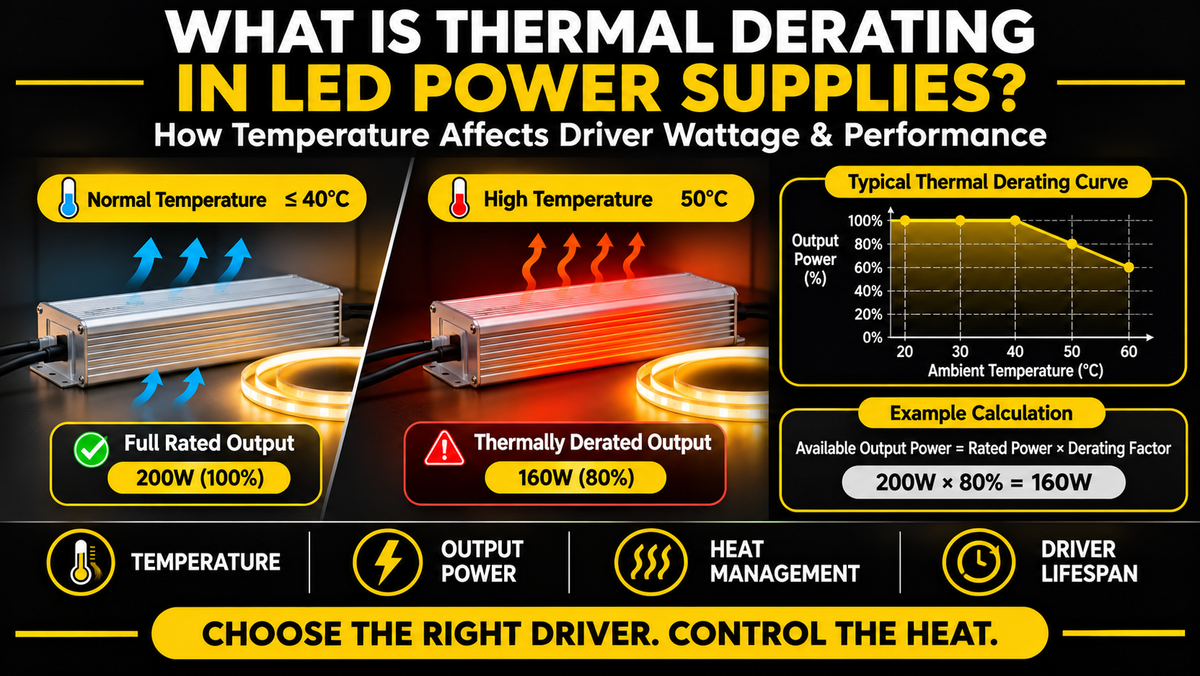
What Is Thermal Derating in LED Power Supplies?
When selecting an LED power supply, most customers focus on three specifications: voltage, wattage, and compatibility.
For example, a 24V LED power supply rated for 200W may appear suitable for an LED strip installation consuming 180W.
But what happens if the power supply is installed inside a hot ceiling cavity, a poorly ventilated cabinet, or an outdoor electrical enclosure exposed to high temperatures?
Can it still deliver its full rated output?
Not necessarily.
Some LED power supplies must operate at reduced output power when ambient temperatures exceed certain limits.
This is known as thermal derating.
Thermal derating is an important concept in LED lighting because it affects how much power a driver can safely deliver under different temperature conditions.
Ignoring thermal derating can contribute to overheating, unexpected shutdowns, flickering, reduced reliability, and premature power supply failure.
In this guide, we'll explain how thermal derating works, how to calculate the available power of an LED driver at higher temperatures, and how to select the right power supply for reliable LED lighting installations.
Every product page in our drivers and transformers range publishes the operating temperature range, efficiency and protection features that this guide refers to.
1. What Does Thermal Derating Mean?
Thermal derating is the reduction of a device's allowable electrical output as its operating temperature increases.
In LED power supplies, thermal derating typically means that the maximum permitted output power or current decreases above a specified temperature.
Simple Example
Imagine a 200W LED power supply.
Under normal operating conditions, it may be rated to deliver its full 200W output.
However, the manufacturer's specifications might indicate that:
At 40°C ambient temperature, it can deliver 200W.
At 50°C, it can deliver 160W.
At 60°C, it can deliver 120W.
These values are hypothetical and are used only to illustrate the concept.
The actual derating characteristics depend on the power supply model.
Key Point
A power supply's nameplate wattage does not necessarily represent its maximum permissible output under every temperature condition.
The manufacturer's derating specifications must also be considered.
For our own range, the published figure is the operating temperature range rather than a derating curve. The 60W Compact, 288W Triple-Output and 384W 4-Channel are each specified for −40°C to +60°C. If you need a load-versus-temperature curve for a particular project, contact us and we will request it from the manufacturer rather than have you estimate one.
2. Why Do LED Power Supplies Need Thermal Derating?
LED power supplies contain electronic components that generate heat during operation.
These components may include:
Power semiconductors
Transformers and inductors
Capacitors
Rectifiers
Control circuits
Electrical connections
Although LED drivers are designed to operate efficiently, they are not 100% efficient.
Some electrical energy is converted into heat.
Example: A 90% Efficient LED Driver
Suppose an LED driver delivers 180W of output power at 90% efficiency.
Its approximate input power is:
180W ÷ 0.90 = 200W
The difference is:
200W − 180W = 20W
Approximately 20W is dissipated as heat within the power supply.
Why Does This Matter?
As ambient temperature increases, the power supply has less ability to transfer its internally generated heat to the surrounding environment.
This can cause internal components to operate at higher temperatures.
Thermal derating helps keep component temperatures within acceptable limits.
Important
Actual efficiency changes with load, input voltage, temperature, and driver design.
The calculation above is a simplified illustration.
The 90% figure is close to our own range: the 200W 5-in-1 is rated above 90%, the 300W up to 91.75%, and the 384W 4-Channel up to 93%. On a 384W load, the difference between 88% and 93% efficiency is roughly 25W of heat that the enclosure never has to shed — which is why efficiency matters for thermal reasons as well as energy ones.
3. What Happens When an LED Driver Gets Too Hot?
Excessive operating temperature can affect LED power supplies in several ways.
A. Reduced Available Output Power
Some manufacturers specify lower maximum output power at elevated ambient temperatures.
For example, a driver rated for 200W under standard conditions may only be permitted to deliver 140W at a higher temperature.
If the connected LED strips require more than the permitted output, the installation may be operating outside the driver's specifications.
B. Automatic Shutdown
Some LED power supplies include overtemperature protection.
When internal temperatures exceed a protection threshold, the driver may shut down or reduce output.
Depending on the model, operation may resume after the unit cools.
However, protection behavior varies.
Ours include thermal protection with auto-recovery — the 200W and 300W 5-in-1 both list thermal shutdown with automatic recovery, and the 384W adds over-temperature protection with intelligent voltage reduction.
C. LED Strip Flickering
Excessive heat can contribute to unstable operation.
Possible symptoms include:
Flickering
Intermittent illumination
Unexpected shutdowns
Repeated power cycling
Brightness fluctuations
These symptoms can also result from overload, voltage drop, wiring faults, or incompatible controls.
D. Reduced Component Lifespan
High operating temperatures can accelerate the aging of certain electronic components.
Electrolytic capacitors, for example, can be particularly sensitive to sustained high temperatures.
The actual effect depends on component specifications and operating conditions.
E. Permanent Power Supply Damage
Operating beyond specified thermal limits can eventually damage internal components.
Severe overheating may create electrical and fire hazards.
Important
Thermal protection is not a substitute for proper installation and sizing.
A power supply should operate within its specified temperature and load limits during normal use.
4. What Is a Thermal Derating Curve?
A thermal derating curve is a graph showing how a power supply's allowable output changes with temperature.
Manufacturers often include these curves in technical datasheets.
The horizontal axis typically represents ambient temperature.
The vertical axis may represent:
Percentage of rated output power
Maximum output current
Maximum allowable load
Hypothetical Derating Example
Consider a 200W LED power supply with the following illustrative derating characteristics:
| Ambient Temperature | Allowed Output | Maximum Output Power |
|---|---|---|
| 20°C | 100% | 200W |
| 30°C | 100% | 200W |
| 40°C | 100% | 200W |
| 45°C | 90% | 180W |
| 50°C | 80% | 160W |
| 55°C | 70% | 140W |
| 60°C | 60% | 120W |
These are example values, not specifications for an actual product.
How to Interpret the Curve
At 40°C, the power supply can deliver its full rated output.
At 50°C, only 80% of the rated output is permitted.
At 60°C, the permitted output decreases to 60%.
Why Is This Important?
If your LED installation requires 170W continuously, the hypothetical power supply would be:
Within its output limit at 40°C
Above its output limit at 50°C
Significantly above its output limit at 60°C
A system that operates correctly in a cool environment may therefore become unreliable in a hotter location.
Note the distinction between this table and a stated operating temperature range. Our drivers specify −40°C to +60°C, which describes the conditions under which the unit may be operated — not a guarantee that full rated output is available at every point in that range. Section 8 covers why those are different claims.
5. How to Calculate Thermal Derating for an LED Power Supply
The basic calculation is:
Available Output Power = Rated Power × Derating Factor
The derating factor is the allowable output percentage expressed as a decimal.
Example 1: 200W Driver at 80% Capacity
Rated output:
200W
Derating factor:
80% = 0.80
Available output:
200W × 0.80 = 160W
At this temperature, the maximum permitted output is 160W.
Example 2: 150W Driver at 70% Capacity
150W × 0.70 = 105W
The driver can deliver up to 105W under the specified conditions.
Example 3: 300W Driver at 60% Capacity
300W × 0.60 = 180W
Although the driver is labeled 300W, the permitted output is only 180W at that temperature.
Important
Do not assume every LED power supply follows the same derating percentages.
Use the manufacturer's actual temperature-versus-load specifications.
All three example wattages exist in our range — the 200W, 150W and 300W 5-in-1 drivers — so the arithmetic above can be applied directly to a real specification.
6. How to Calculate the Required Driver Size After Derating
Thermal derating also affects how you choose the original driver wattage.
Suppose your LED strip installation requires 160W.
You expect the driver to operate at a temperature where only 80% of its rated output is permitted.
The required nameplate rating can be estimated using:
Required Rated Power = LED Load ÷ Derating Factor
Calculation:
160W ÷ 0.80 = 200W
A 200W driver would meet the calculated output requirement at that temperature, assuming all other specifications are satisfied.
What If the Driver Is Rated for Only 180W?
180W × 0.80 = 144W
The available output would be 144W.
That is below the required 160W load.
Recommendation
Select a power supply that can deliver the required load at the highest expected operating temperature, not just at normal room temperature.
That calculation lands exactly on our 200W 5-in-1 driver. It is also a good illustration of why the range steps the way it does — 30W, 60W, 80W, 100W, 150W, 200W, 300W and 384W — since a derated requirement rarely lands on a round number and you generally take the next rung up.
7. Thermal Derating vs the 80% Loading Rule
Thermal derating and the common recommendation to leave extra driver capacity are related but different concepts.
Thermal Derating
A manufacturer-specified reduction in allowable output under particular operating conditions.
Design Headroom
Additional capacity intentionally provided to accommodate operating conditions, tolerances, and future requirements.
For example, some installers use approximately 20% spare capacity as a general design guideline.
However, this is not a universal rule for every LED driver.
Example
Suppose an LED installation requires 120W.
A 150W driver provides:
120W ÷ 150W = 80% loading
This leaves 20% of the driver's nameplate capacity unused.
But if the manufacturer requires thermal derating to 70% at the actual installation temperature:
150W × 0.70 = 105W
The available output would be only 105W.
The 120W installation would exceed the permitted output.
Key Takeaway
A general wattage margin does not replace the manufacturer's thermal derating requirements.
Both must be considered when designing a reliable system.
This is worth reading alongside the usual advice elsewhere on this site. We routinely suggest sizing a driver about 20–30% above the calculated load, and that remains sound guidance for an ordinary indoor installation at room temperature. In a hot location it is a starting point rather than a sufficient answer — the 150W driver in the example above is correctly sized by the margin rule and still short once derating is applied.
8. What Temperature Causes LED Power Supplies to Derate?
There is no universal temperature at which all LED power supplies begin derating.
The threshold depends on the manufacturer's design and specifications.
Some drivers may deliver full rated output across a relatively wide temperature range.
Others may require output reduction at lower temperatures.
Factors That Influence Derating
Driver efficiency
Internal component ratings
Housing construction
Cooling method
Ambient temperature
Input voltage
Mounting orientation
Air circulation
Enclosure design
Important
A manufacturer's operating temperature range does not necessarily mean full rated output is available throughout that entire range.
Always check the derating curve or load-versus-temperature specification.
This applies to our own published figures and is worth stating plainly. A specification of −40°C to +60°C on the 288W transformer or the 384W driver tells you the unit may be operated across that range. It is not a claim that 288W or 384W is available at +60°C. For an installation that will genuinely run near the top of that range, ask us for the manufacturer's load-versus-temperature data before finalising the design.
On housing construction, the third factor above: our junction-box transformers use aluminum enclosures, which conduct heat considerably better than a plastic housing of the same size.
9. Ambient Temperature vs Case Temperature
These are two different measurements.
Understanding the difference is essential when evaluating LED driver thermal performance.
Ambient Temperature (Ta)
Ambient temperature refers to the temperature of the air surrounding the power supply.
For example, a driver installed inside a cabinet may experience an ambient temperature significantly higher than the room temperature.
Case Temperature (Tc)
Case temperature refers to the temperature measured at a designated point on the driver's housing.
Some manufacturers specify a maximum permissible case temperature.
Why Does This Matter?
A room may be at 25°C while the driver's housing operates at a much higher temperature.
Internal heat generation and limited ventilation can cause this difference.
Important
A maximum case temperature is not interchangeable with a maximum ambient temperature.
Follow the manufacturer's specified measurement locations and operating limits.
10. Why Enclosed Installations Can Cause Thermal Problems
LED power supplies are frequently installed in locations where airflow is limited.
Examples include:
Kitchen cabinets
Ceiling cavities
Electrical enclosures
Furniture compartments
Display cases
Utility closets
Architectural lighting recesses
These locations can trap heat.
Example: Kitchen Cabinet Installation
A driver is installed inside a closed cabinet.
The room temperature is 24°C.
However, heat from the driver and nearby equipment raises the temperature inside the cabinet to 42°C.
If the driver requires derating above 40°C, its available output may be lower than expected.
Better Installation Practices
Follow manufacturer clearance requirements.
Avoid unnecessary heat accumulation.
Provide ventilation where appropriate.
Keep drivers away from additional heat sources.
Use a driver rated for the actual installation environment.
Important
Do not modify a listed electrical enclosure or compromise its environmental protection to add ventilation.
Any ventilation arrangement must remain compatible with the enclosure's electrical and environmental requirements.
Cabinet installations are where our compact transformers are most often used, and there is a trade-off worth understanding. The 60W Compact is 3.31 inches long, which is why it fits inside cabinetry at all — but a smaller enclosure has less surface area to shed heat through, so clearance around it matters more than it would for a larger unit, not less. Fitting it into the tightest available void defeats the point.
11. Does an IP65 LED Driver Need Thermal Derating?
It may.
IP65 describes a level of protection against dust ingress and water jets under specified test conditions.
It does not guarantee that the power supply can operate at full rated output at every ambient temperature.
Why Can Sealed Drivers Get Hot?
Sealed housings may have limited air exchange with the surrounding environment.
However, many sealed drivers are designed to transfer heat through their housing.
Their actual thermal performance depends on construction and installation.
Outdoor Installation Considerations
Outdoor drivers may experience:
High ambient temperatures
Direct sunlight
Heat buildup inside electrical enclosures
Limited airflow
Seasonal temperature changes
Important
Direct sunlight can raise the driver's case temperature above the surrounding air temperature.
A shaded mounting location may help reduce solar heating, provided the installation follows manufacturer requirements.
Recommendation
When selecting an outdoor LED driver, verify both the required environmental protection rating and the allowable output at the expected operating temperature.
Our IP65 units — the 288W Triple-Output and 384W 4-Channel, both rated for wet locations and NEMA 4X in the case of the 384W — use aluminum housings that transfer heat through the enclosure rather than relying on air exchange. That is the construction the section above describes. It does not exempt them from the same question: for a driver mounted in full sun, request the derating data.
12. Can Thermal Derating Affect COB LED Strip Installations?
Yes.
Thermal derating applies to the power supply regardless of whether the connected LED strips use COB or SMD technology.
Example
Suppose you install 40 feet of 24V COB LED strip.
The strip consumes 4W per foot.
Total power:
40 × 4W = 160W
You select a 200W, 24V constant-voltage driver.
Under normal conditions, the load represents:
160W ÷ 200W = 80%
However, suppose the driver's derating curve permits only 70% output at the actual operating temperature.
Available power:
200W × 0.70 = 140W
The LED strip load exceeds the permitted output by 20W.
Possible Results
Depending on the driver design, the system may experience:
Thermal shutdown
Intermittent operation
Reduced reliability
Excessive operating temperatures
Premature driver failure
Solution
Select a driver with adequate derated capacity or improve the installation's thermal conditions.
There is a third option the example does not mention: reduce the load by choosing a lower-power strip. Across our COB range, 40 feet comes to about 73W of the 6.5mm Ultra Slim at 1.83 W/ft, 122W of the 8mm at 3.05 W/ft, 171W of the 10mm at 4.27 W/ft, or 293W of the 12mm Double-Row at 7.32 W/ft. If the derated figure is the binding constraint, specifying one step down the strip range solves it without a larger driver or a better-ventilated location.
13. Does Thermal Derating Affect 12V and 24V LED Drivers Differently?
Both 12V and 24V LED drivers can be subject to thermal derating.
The derating behavior depends on the actual driver model rather than voltage alone.
However, voltage affects the output current required for a given power level.
Example: 120W Load
At 12V:
120W ÷ 12V = 10A
At 24V:
120W ÷ 24V = 5A
The 24V system requires half the current for the same output power.
Why Does This Matter?
Lower current can reduce resistive losses in certain parts of the wiring system.
However, it does not automatically mean that a 24V driver will operate cooler or have less thermal derating than a 12V driver.
Driver efficiency and thermal design remain important.
Our 5-in-1 drivers are 12V/24V selectable and carry the same wattage rating either way — the 300W, for instance, delivers 300W at 12V (25A) or 300W at 24V (12.5A). The nameplate does not change with the voltage setting, but the output current does, which is why the output wiring is specified differently for each.
14. Thermal Derating vs Overtemperature Protection
These terms are related but not identical.
| Feature | Thermal Derating | Overtemperature Protection |
|---|---|---|
| Purpose | Defines allowable output under thermal conditions | Responds to excessive temperature |
| Normal operation | Design operating limit | Protective response |
| Output effect | Reduced permitted load | Shutdown, current reduction, or other response |
| Manufacturer documentation | Derating curve or table | Protection specifications |
| Main objective | Prevent operation beyond thermal capability | Limit damage during abnormal conditions |
Important Distinction
A thermal derating curve does not necessarily mean the driver automatically reduces its output.
For many products, derating is a requirement that the installer must follow by limiting the connected load.
Other products may include active thermal foldback that automatically reduces output.
Always verify which behavior applies to the specific power supply.
Our range contains examples of both behaviours. The 384W 4-Channel driver specifies over-temperature protection with intelligent voltage reduction, which is active foldback — it reduces output itself. The 288W transformer describes overload protection as output power reduction with recovery. The 200W and 300W 5-in-1 drivers list thermal shutdown with auto-recovery, which is a protective response rather than a graduated reduction. Worth checking which you are buying, because the first keeps the lights on at reduced output and the last turns them off.
15. Does Thermal Derating Reduce LED Driver Lifespan?
Thermal derating itself is intended to help protect the driver.
The greater concern is operating a driver beyond its permitted thermal limits.
How Heat Affects Electronics
Elevated temperature can accelerate the aging of certain electronic components.
Potential effects include:
Reduced capacitor life
Increased semiconductor stress
Degradation of insulation materials
Reduced reliability of electrical connections
Greater likelihood of thermal protection events
Can a Cooler Driver Last Longer?
Operating within appropriate thermal limits generally supports better long-term reliability.
However, actual lifespan depends on component design, manufacturing quality, operating conditions, and duty cycle.
Important
Avoid assuming that every 10°C temperature increase cuts driver lifespan in half.
Such simplified rules may apply approximately to certain component aging models, but they are not universal lifespan predictions for complete LED power supplies.
One practical consolation: because strips, drivers and controllers are sold separately, a driver that fails early means replacing one component rather than an installed run of strip.
16. How to Improve LED Power Supply Thermal Performance
A. Select an Appropriately Rated Driver
Choose a power supply with sufficient output capacity at the maximum expected temperature — see the full drivers and transformers range.
B. Follow Mounting Instructions
Mount the driver according to the manufacturer's specified orientation and clearance requirements.
C. Provide Suitable Airflow
Where permitted, allow sufficient airflow around the driver.
D. Avoid Nearby Heat Sources
Do not position the driver unnecessarily close to heaters, hot appliances, or other equipment that raises ambient temperature.
E. Consider the Enclosure
A sealed or crowded enclosure may require additional thermal evaluation.
F. Use Efficient Drivers
A more efficient driver generally dissipates less heat at the same output power, although actual thermal performance also depends on construction.
In our range that points to the 384W 4-Channel at up to 93% and the 300W 5-in-1 at up to 91.75%.
G. Avoid Unnecessary Overloading
Keep the connected load within the driver's allowable operating limits.
H. Consider Multiple Drivers
In some installations, distributing the load across multiple appropriately rated drivers may improve installation flexibility and thermal management.
However, each driver's location and thermal conditions must still be evaluated.
A multi-channel unit is a middle option here: the 288W Triple-Output is three independent 96W channels in one enclosure and the 384W is four. That divides the lighting into zones without multiplying the number of units to find space for — though it also concentrates the heat in one place, which is the trade-off section 17 describes.
17. One Large LED Driver vs Multiple Smaller Drivers
For larger installations, choosing between one large driver and multiple smaller drivers can affect thermal design.
One Large Driver
Potential advantages:
Fewer power supply units
Simplified component count
Centralized power distribution
Potential disadvantages:
Greater heat concentration in one location
Higher output current
Potentially longer low-voltage wiring runs
A single point of failure
Multiple Smaller Drivers
Potential advantages:
Distributed heat generation
Shorter low-voltage wiring runs in some layouts
Easier separation of lighting zones
Potentially simpler future maintenance
Potential disadvantages:
More electrical components
Additional installation space
More wiring and connections
Potentially higher overall cost
Recommendation
Choose the arrangement based on electrical requirements, installation conditions, thermal management, and maintenance considerations.
Multiple drivers do not automatically guarantee better cooling.
For a 300W installation the comparison in our range is one 300W driver against several smaller units such as the 100W or 150W — or the 288W Triple-Output, which splits the output into three channels while keeping the heat in a single enclosure. Which of those is better depends entirely on whether you have one well-ventilated location or several ordinary ones.
18. How to Recognize a Thermal Derating Problem
A driver operating beyond its permitted thermal conditions may show certain symptoms.
Possible Warning Signs
LED strips shut down after operating for a while.
Lighting resumes after the system cools.
Flickering occurs in hot weather.
Problems appear only when the enclosure is closed.
The driver operates normally at lower loads.
Repeated shutdowns occur during long operating periods.
Important
These symptoms are not unique to thermal derating.
Other possible causes include:
Driver overload
Incorrect voltage
Wiring faults
Poor connections
LED controller overload
Short circuits
Defective equipment
Proper troubleshooting is necessary.
The fourth warning sign is the most diagnostic of the six, because closing an enclosure changes the thermal conditions and nothing else. If a system is stable with the cabinet door open and fails with it shut, that points at temperature rather than at the controller or the wiring.
19. How to Troubleshoot an Overheating LED Power Supply
Step 1: Disconnect Power Safely
Turn off power before inspecting the installation.
If there are signs of burning, damaged insulation, or severe overheating, do not re-energize the system until it has been professionally evaluated.
Step 2: Identify the Driver Model
Locate the manufacturer's technical datasheet.
Step 3: Check the Temperature Ratings
Review:
Operating ambient temperature range
Maximum case temperature
Thermal derating curve
Mounting and ventilation requirements
The first and last are on every page in our drivers range; for the derating curve, contact us.
Step 4: Calculate the LED Load
Determine the total connected wattage. Watts per foot is published on every page in our strip range.
Step 5: Determine Available Output
Use the derating curve to calculate the maximum permitted output at the actual operating temperature.
Step 6: Inspect the Installation Environment
Check for:
Limited ventilation
Nearby heat sources
Direct sunlight
Overcrowded electrical enclosures
Incorrect mounting orientation
Step 7: Check Other Components
Verify the LED controller, wiring, connectors, and LED strips.
Step 8: Correct the Problem
Depending on the cause, the solution may involve:
Relocating the driver
Improving permitted ventilation
Reducing the connected load
Selecting a driver with higher allowable output
Using a more suitable driver model
Dividing the load across multiple circuits
Safety Note
Temperature measurements and energized electrical troubleshooting should be performed by appropriately qualified personnel using suitable equipment.
20. Common Mistakes When Selecting LED Drivers
Mistake 1: Looking Only at Nameplate Wattage
A 200W driver may not deliver 200W at every operating temperature.
Mistake 2: Ignoring the Derating Curve
The derating curve is an important part of the manufacturer's specifications.
Mistake 3: Assuming All Drivers Have the Same Temperature Limits
Different products have different thermal capabilities.
Mistake 4: Confusing Ambient and Case Temperature
These are separate measurements with different meanings.
Mistake 5: Installing Drivers in Hot Enclosures Without Evaluation
Enclosure temperature can be significantly higher than room temperature.
Mistake 6: Assuming IP65 Means Heatproof
Environmental protection ratings do not establish thermal output capability.
Mistake 7: Relying on Thermal Shutdown
Protection circuits are not a substitute for correct sizing.
Mistake 8: Assuming 20% Spare Capacity Is Always Enough
The required capacity depends on the manufacturer's derating specifications.
Mistake 9: Ignoring Input Voltage Conditions
Some drivers also require output derating at particular input voltages. Our 5-in-1 drivers accept 110–277VAC; confirm the available supply voltage before specifying.
Mistake 10: Assuming All Drivers Automatically Derate
Some products specify installer-enforced load limits rather than automatic output reduction. Section 14 lists which of ours do which.
21. Quick Decision Summary
| Installation Condition | Recommended Action |
|---|---|
| Driver operates in a cool, ventilated location | Verify normal rated output conditions |
| Driver installed inside a closed cabinet | Check actual enclosure temperature |
| Driver exposed to high ambient temperature | Review thermal derating curve |
| Driver installed outdoors | Check temperature and environmental ratings |
| Driver near its maximum wattage | Verify allowable output at operating temperature |
| LED strips shut down after warming up | Investigate thermal protection and overload |
| Driver requires 80% derating | Multiply rated power by 0.80 |
| Available output is below LED load | Select a suitable driver or reduce load |
| Driver installed in direct sunlight | Evaluate solar heating and mounting location |
| Planning a large LED installation | Consider thermal design and power distribution |
The Bottom Line: Always size an LED power supply based on the output it can safely deliver at the expected operating temperature—not only its nameplate wattage.
Two rows point to specific products in our range: for the outdoor and direct-sunlight rows, the IP65 288W and 384W units are the wet-location options, and for "reduce load" the quickest lever is usually a lower-W/ft strip rather than a shorter run.
22. Professional LED Power Supply Checklist
Before selecting or installing an LED driver, confirm:
LED strip voltage matches the power supply.
Constant-voltage or constant-current requirements are correct.
Total connected wattage has been calculated.
Driver nameplate wattage is sufficient.
Thermal derating specifications have been reviewed.
Maximum expected ambient temperature is considered.
Case temperature limits are understood.
Input voltage derating has been checked if applicable.
Mounting orientation follows manufacturer instructions.
Required ventilation and clearances are provided.
Environmental protection rating is appropriate.
Driver efficiency is suitable.
Wiring and connectors are correctly rated.
LED controller capacity has been verified.
Applicable electrical codes and installation instructions are followed.
Voltage, wattage, efficiency, operating temperature range, protections, IP rating and certifications are published on every page in our drivers and transformers range, and controller current ratings on every page in the controllers range.
Frequently Asked Questions
1. What is thermal derating in an LED power supply?
Thermal derating is the reduction in a power supply's allowable output power or current at elevated operating temperatures.
2. Why do LED drivers need thermal derating?
It helps prevent excessive internal component temperatures and supports reliable operation.
3. Does every LED power supply have thermal derating?
Not every product has the same derating behavior. Some specify full output across their operating temperature range, while others require output reduction.
4. What is a thermal derating curve?
It is a graph showing the maximum allowable output as temperature changes.
5. Can a 200W LED driver always deliver 200W?
No. Its allowable output may decrease under certain temperature or input voltage conditions.
6. How do I calculate derated wattage?
Multiply the rated output wattage by the applicable derating factor.
7. What does 80% derating mean?
It means the permitted output is 80% of the rated value under the specified conditions.
8. Is thermal derating the same as the 80% loading rule?
No. Thermal derating is a manufacturer-defined operating limitation, while leaving spare capacity is a design practice.
9. Can thermal derating cause LED strips to flicker?
Operating beyond the driver's thermal capability may contribute to unstable operation, but flickering can have other causes.
10. Can an LED driver shut down when it gets too hot?
Yes. Some drivers include overtemperature protection that reduces output or shuts down the device. Ours include thermal protection with auto-recovery — see the product pages for each model's behaviour.
11. Does thermal derating mean the driver automatically reduces brightness?
Not necessarily. Some drivers actively reduce output, while others require the installer to limit the connected load. The 384W 4-Channel is an example of the former.
12. What is the difference between ambient and case temperature?
Ambient temperature refers to the surrounding air. Case temperature refers to a specified point on the driver's housing.
13. Are waterproof LED drivers affected by heat?
Yes. Environmental protection ratings do not eliminate thermal limitations.
14. Does a 24V LED driver run cooler than a 12V driver?
Not automatically. Thermal performance depends on driver efficiency, design, load, and operating conditions.
15. Can I install an LED driver inside a cabinet?
Only when the driver is suitable for that installation and its clearance and thermal requirements can be satisfied. Our compact transformers are designed for tight spaces, but still need clearance around them.
16. Does direct sunlight affect outdoor LED drivers?
Yes. Solar heating can increase case temperature and affect allowable operating conditions.
17. Does a higher-wattage driver always solve overheating?
No. A larger driver may still overheat if its installation conditions or thermal limits are unsuitable.
18. Can thermal derating affect LED driver lifespan?
Operating beyond thermal limits can accelerate component aging and reduce reliability.
19. Where can I find an LED driver's derating specifications?
Check the manufacturer's datasheet, technical documentation, or installation instructions. Our product pages publish the operating temperature range and protection features; for a full load-versus-temperature curve, contact us and we will request it from the manufacturer.
20. What is the best way to prevent thermal derating problems?
Choose a driver with sufficient allowable output at the expected temperature and install it according to manufacturer requirements.