
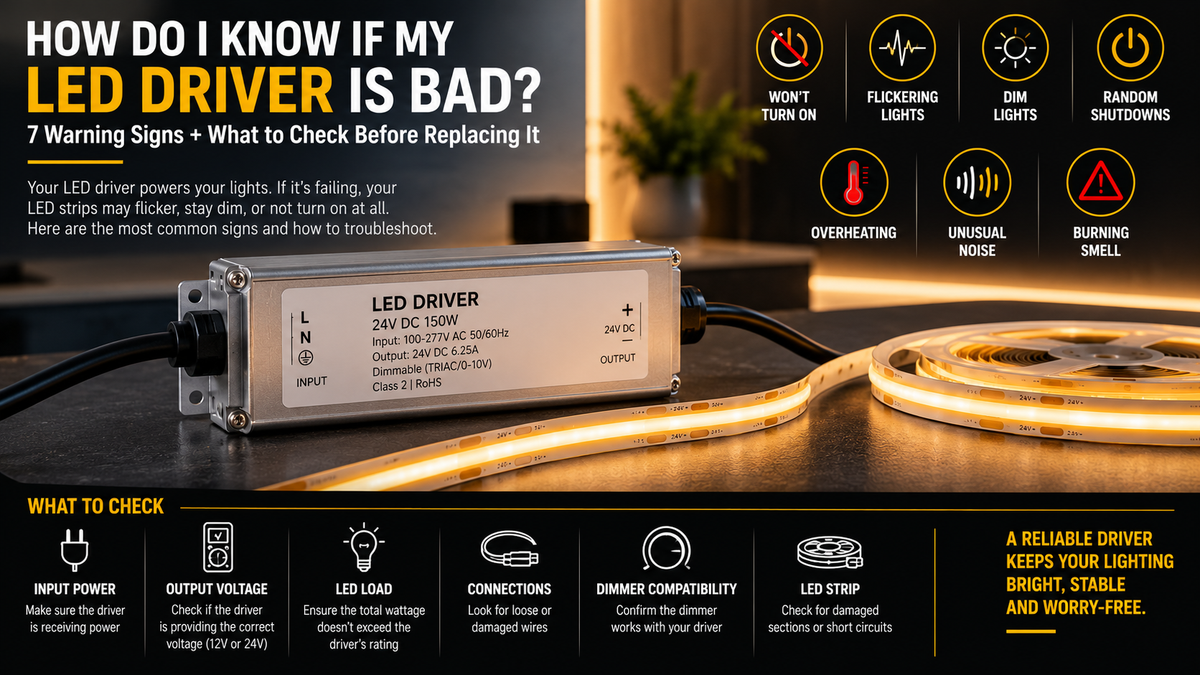
Your LED lights suddenly start flickering.
Maybe they don't turn on at all.
Or perhaps they work normally for a few minutes, shut off, and then mysteriously come back on later.
It's easy to immediately blame the LED strip or fixture.
But sometimes the real problem is the LED driver.
The LED driver or power supply is one of the most important components in an LED lighting system. If it can't provide the correct and stable electrical output, the LEDs may behave unpredictably—or stop working completely.
So, how do you know if your LED driver is actually bad?
There are several warning signs, but troubleshooting is important because symptoms associated with a failing driver can also be caused by wiring, dimmers, controllers, overloaded circuits, or damaged LEDs.
Here's what to check.
What Does an LED Driver Do?
An LED driver provides the electrical power required by the LED lighting system.
For many low-voltage LED strip installations, it converts incoming line voltage into the appropriate low-voltage DC output.
For example:
120V AC → LED Driver → 24V DC → 24V COB LED Strip
The exact configuration depends on the product.
A driver may also provide features such as:
- Dimming
- Overload protection
- Short-circuit protection
- Thermal protection
- Over-voltage protection
Available features vary by model.
If the driver stops operating correctly, everything connected to it can be affected.
1. The LED Lights Don't Turn On
This is the most obvious symptom.
You flip the switch and:
Nothing happens.
A failed driver is one possible cause—but don't immediately replace it.
The problem could also be:
- No incoming power
- Tripped breaker
- Loose connection
- Incorrect wiring
- Failed dimmer
- Failed controller
- Damaged LED strip
- Blown protection device
- Incorrect voltage
The first step is determining whether the driver is receiving the correct input power.
If input power is present but the expected output is absent, the driver becomes a stronger suspect.
2. The LEDs Flicker
Flickering is one of the most common LED troubleshooting symptoms.
A failing driver can produce unstable output, resulting in visible flickering.
However, flickering can also come from:
- Incompatible dimmer
- Loose wiring
- Overloaded driver
- Poor connections
- Voltage fluctuations
- Damaged LED strip
- Controller problems
- Incorrect driver type
If the system previously operated normally and suddenly begins flickering without any other changes, a deteriorating component—including the driver—is worth investigating.
3. The Lights Turn On and Off by Themselves
Suppose your LEDs operate normally for several minutes.
Then:
Lights Off
A few minutes later:
Lights On Again
This can indicate that a protection circuit is activating.
For example, the driver may be:
- Overloaded
- Overheating
- Experiencing a short
- Operating outside its rated conditions
Some drivers automatically shut down when unsafe conditions are detected and resume operation after conditions change.
Repeated cycling shouldn't be ignored.
4. The Driver Gets Excessively Hot
Some warmth is normal.
LED drivers aren't 100% efficient, so they generate heat during operation.
But excessive heat can indicate a problem.
Possible causes include:
- Driver overload
- Poor ventilation
- High ambient temperature
- Loose electrical connections
- Incorrect installation
- Internal component failure
- Driver operating near or beyond its limits
If the driver repeatedly shuts down as it becomes hot and starts working again after cooling, thermal protection may be involved.
But don't assume the driver itself is defective until the load and installation conditions have been checked.
5. The LEDs Are Dimmer Than Normal
A failing or incorrectly operating driver may not provide the expected output.
As a result, the LEDs can appear dimmer.
But low brightness can also result from:
- Voltage drop
- Long strip runs
- Undersized wiring
- Incorrect dimmer setting
- Controller limitations
- Excessive strip length
- Poor connections
- Wrong power supply voltage
If all LEDs connected to one driver suddenly become dimmer at the same time, checking the driver is a logical troubleshooting step.
6. Brightness Changes Randomly
Your lights shouldn't randomly become brighter and dimmer when the dimming control isn't being adjusted.
If they do, possible causes include:
- Unstable driver output
- Dimmer incompatibility
- Controller issues
- Loose connections
- Input voltage problems
Try to determine whether the problem occurs:
Only when dimming
or
At all brightness levels
If it happens only during dimming, compatibility may be the problem rather than a defective driver.
7. The Driver Makes an Unusual Noise
Some LED drivers and dimming systems may produce a slight audible sound under certain operating conditions.
But a new or unusually loud:
- Buzz
- Hum
- Clicking
- High-pitched noise
can indicate that something has changed.
Potential causes include:
- Dimmer incompatibility
- Heavy load
- Loose components
- Electrical resonance
- Internal deterioration
Noise alone doesn't prove the driver has failed, but it deserves investigation—especially if it appears alongside flickering, overheating, or shutdowns.
8. There's a Burning Smell
This is a warning sign you should never ignore.
If you notice:
- Burning odor
- Smoke
- Melted insulation
- Discoloration
- Burn marks
- Damaged terminals
turn the system off.
Don't continue operating the lighting while trying to see whether the problem disappears.
The system should be inspected before being powered again.
9. The Driver Works Intermittently
Intermittent operation can be frustrating because the system may appear completely normal during testing.
For example:
Morning → Works
Evening → Doesn't work
Next day → Works again
Potential causes include:
- Thermal problems
- Loose connections
- Internal driver failure
- Dimmer problems
- Controller issues
- Input-power problems
Intermittent failures often require testing under the conditions in which the problem actually occurs.
10. The Driver Is Repeatedly Tripping Protection
Many quality LED drivers include protective features.
Depending on the model, protection may activate because of:
- Overload
- Short circuit
- Excessive temperature
- Abnormal voltage conditions
If the driver repeatedly enters protection mode, don't simply reset it over and over.
Find the underlying cause.
The protection system may actually be doing exactly what it was designed to do.
Is the Driver Really Bad—or Just Overloaded?
This is one of the most important questions.
A perfectly functional driver can behave badly if you connect too much LED load to it.
Calculate:
Watts per Foot × Total LED Strip Length = Approximate LED Load
For example:
If your COB strip consumes:
4.5W per foot
and you're using:
20 feet
then:
4.5 × 20 = 90W
Using a 60W driver would clearly be inadequate.
Even operating continuously at the absolute maximum rating may not be ideal for every product or installation.
A commonly used design approach is to provide approximately 20% additional capacity, although the manufacturer's requirements should always take priority.
For the 90W load in the example above, a 150W 5-in-1 Dimmable LED Driver leaves comfortable headroom, while a 100W unit would be running close to its limit.
Check the Voltage
The driver output must match the LED system.
For example:
12V LED Strip → Compatible 12V Driver
24V LED Strip → Compatible 24V Driver
Don't assume a higher voltage driver is simply a “stronger” driver.
Connecting an incompatible voltage can damage LEDs or other components.
Always verify the ratings before powering the system.
If you aren't certain which voltage a replacement needs to be, a selectable unit such as the 60W 5-in-1 Dimmable LED Driver (12V / 24V) can be set to match either type of strip.
Check the Dimmer Before Replacing the Driver
This is particularly important with dimmable systems.
Suppose your LEDs:
- Flicker at low brightness
- Buzz
- Turn off before reaching minimum brightness
- Flash when switched on
- Don't dim smoothly
The driver might be completely functional.
The problem could be an incompatible dimmer.
Depending on the driver, the system may use:
- TRIAC
- ELV
- MLV
- 0–10V
- PWM/control systems
- Other dimming methods
Make sure the driver and control method are designed to work together.
If you don't know which protocol your existing wall dimmer uses, a 100W 5-in-1 Dimmable LED Driver supports all five methods, which removes protocol mismatch as a variable. For tunable white systems, the 24V 100W CCT LED Driver with Built-in Dimmer avoids an external dimmer entirely.
Check the LED Strip
Before declaring the driver dead, inspect the LEDs.
Look for:
- Burned sections
- Damaged PCB
- Broken solder joints
- Damaged connectors
- Incorrect polarity
- Cut-point damage
- Water damage
- Physical damage
If only one section of a long strip has failed while everything else works normally, the driver may not be the problem.
Check All Connections
A loose electrical connection can imitate driver failure.
Inspect appropriate accessible connections for:
- Loose terminals
- Poor connectors
- Damaged wires
- Incorrect polarity
- Corrosion
- Overheated connection points
Connections should be secure and appropriate for the electrical load.
If you're working with line-voltage wiring or aren't qualified to inspect the installation safely, use a qualified electrician.
Check for Voltage Drop
Suppose the LEDs near the driver are bright, but those farther away become dimmer.
That pattern often points more toward voltage drop than a failing driver.
Voltage drop becomes more significant with:
- Long LED runs
- High current
- Long wire runs
- Undersized wiring
Depending on the system, the solution may involve:
- Larger wire
- Shorter feeds
- Parallel wiring
- Power injection
- Different driver placement
Replacing a perfectly good driver won't necessarily solve voltage drop. For long runs split into separately fed zones, a multi-channel unit such as the 192W Dual-Channel 24V Dimmable Transformer lets you feed each section independently from one location.
How Can You Test an LED Driver?
Electrical testing should be performed only if you have the appropriate knowledge and equipment.
A technician may check:
Input
Is the driver receiving its rated input voltage?
Output
Is the driver producing the expected output voltage?
Load Behavior
Does the output remain stable when the LEDs are connected?
Temperature
Does the driver shut down after heating?
Connections
Are terminals and wiring secure?
Dimming
Does the problem disappear when dimming/control components are properly isolated or tested according to manufacturer procedures?
Testing under load can be important because some faults may not appear when the driver isn't powering the lighting system.
Can You Test a 24V LED Driver with a Multimeter?
A qualified person can use an appropriate multimeter to verify the output of a constant-voltage driver.
For a nominal 24V DC driver, the measured output should be consistent with the manufacturer's specified output range and operating conditions.
However, measuring output voltage alone doesn't prove that a driver is healthy.
A driver might show expected voltage with little or no load but become unstable when powering the actual LEDs.
That's why troubleshooting needs to consider the entire system.
A Simple Troubleshooting Sequence
When LED lighting stops working correctly, troubleshoot systematically.
Step 1 — Check Incoming Power
Confirm the circuit and controls are supplying power correctly.
Step 2 — Inspect Connections
Look for loose, damaged, or overheated connections.
Step 3 — Verify Driver Specifications
Check:
Input → Output Voltage → Wattage → Dimming Type
Step 4 — Calculate the LED Load
Make sure the driver isn't overloaded.
Step 5 — Check the LED Strip
Look for visible damage and confirm voltage compatibility.
Step 6 — Check the Dimmer or Controller
Especially if the problem occurs only while dimming.
Step 7 — Check Driver Output
When appropriate and safe, verify electrical output with suitable test equipment.
Step 8 — Substitute a Known-Compatible Driver
When performed safely, testing the LEDs with another correctly specified driver can help isolate the problem.
A plug-in unit such as the 24V 72W Plug-In Transformer is convenient for this kind of bench test on a 24V strip, since it needs no hardwiring. There is a 12V version for 12V systems.
If the system works normally with the replacement driver, the original driver becomes a much stronger suspect.
When Should You Replace the LED Driver?
Replacement may be appropriate when the driver:
- Produces no output despite correct input
- Produces unstable output
- Repeatedly shuts down despite a correct load and installation
- Shows physical heat damage
- Has burned or damaged components
- Fails appropriate electrical testing
- Has reached the end of its service life
Don't replace a driver with just any power supply.
The replacement needs to match the system requirements. Our full range of LED drivers and transformers is organized by wattage, voltage, and dimming type.
What Should You Check When Buying a Replacement?
At minimum, check:
Output Voltage
12V, 24V, or whatever the LED system requires.
Wattage
Enough capacity for the total connected load.
Dimming Type
TRIAC, ELV, MLV, 0–10V, or another required method. A 200W 5-in-1 Dimmable LED Driver covers all of these in a single unit if you want to keep future options open.
Environment
Indoor, damp, or outdoor installation as applicable. For wet or outdoor locations, use a rated unit such as the 96W 24V IP65 Dimmable Transformer.
Physical Installation
Make sure the driver fits the intended location and installation requirements.
Product Quality
For permanent installations, quality and appropriate safety certifications matter.
Can You Use a Higher-Wattage Replacement Driver?
For a constant-voltage LED system, a higher-wattage driver can often be used if the output voltage and other specifications are compatible.
For example, if your 24V LED system requires 80W, a properly compatible 24V 100W driver may be appropriate—the 100W 5-in-1 Dimmable LED Driver would suit that load.
The higher wattage rating means the driver has more available capacity.
It doesn't automatically force the LED strip to consume the driver's full rated wattage.
But voltage, dimming type, environment, and other specifications still need to match.
Does a Bad Driver Damage LED Strips?
Potentially.
Abnormal electrical output can stress or damage LEDs and other components.
Likewise, a damaged or incorrectly installed LED strip can create conditions that affect the driver.
That's why replacing only the failed component without identifying the underlying cause isn't always enough.
For example, replacing an overheated driver without correcting the overload may simply cause the replacement to develop the same problem.
How Long Should an LED Driver Last?
There is no universal lifespan for every driver.
Service life depends on:
- Component quality
- Operating temperature
- Electrical load
- Ventilation
- Environment
- Input-power quality
- Operating hours
- Product design
Heat is particularly important.
Operating electronic components at excessive temperatures can reduce their useful life.
Correct driver sizing and installation can therefore be just as important as buying a quality product.
How to Help Your LED Driver Last Longer
Good installation practices include:
- Don't overload the driver
- Provide appropriate ventilation
- Keep it away from unnecessary heat sources
- Use compatible LED strips
- Match output voltage correctly
- Use appropriate wiring
- Make secure electrical connections
- Use compatible dimmers
- Follow manufacturer installation instructions
- Use an appropriately rated driver for outdoor or damp locations
A driver that operates within its intended conditions is more likely to provide reliable long-term performance. For larger outdoor installations, the 384W 4-Channel 24V IP65 Dimmable Driver is built for wet locations and spreads the load across four separate outputs.
Common Symptoms and Possible Causes
| Symptom | Possible Cause |
|---|---|
| LEDs won't turn on | Driver, wiring, input power, controller, or LEDs |
| Flickering | Driver, dimmer, connection, controller, or input power |
| Random shutdown | Overload, overheating, short circuit, or driver failure |
| Dim LEDs | Voltage drop, driver output, wiring, dimmer, or excessive load |
| Buzzing | Driver/dimmer interaction, load, or component issue |
| Driver very hot | Load, ventilation, ambient temperature, or fault |
| End of strip dim | Often voltage drop rather than driver failure |
| Burning smell | Electrical fault—turn system off and investigate |
The important point is that one symptom doesn't automatically prove the driver is bad.
Final Thoughts
So, how do you know if your LED driver is bad?
Common warning signs include:
- LEDs that won't turn on
- Unexpected flickering
- Random shutdowns
- Unstable brightness
- Excessive driver heat
- New or unusual buzzing
- Intermittent operation
- No or unstable output
But don't immediately replace the driver.
Many of these symptoms can also be caused by:
Wiring + Dimmer + Controller + Overload + Voltage Drop + LED Strip
Troubleshoot the complete system first.
If the driver is receiving correct input power, the LED load is within specification, wiring and controls are correct, and the driver still fails to provide stable output, then replacement may be necessary.
And when you replace it, choose a driver that correctly matches the voltage, wattage, dimming system, and installation environment of your LED lighting. You can browse the complete range of LED drivers and transformers by those specifications.
FAQ
What are the most common signs of a bad LED driver?
Common symptoms include lights that won't turn on, flickering, random shutdowns, unstable brightness, excessive heat, unusual noise, and intermittent operation.
Can a bad LED driver cause flickering?
Yes. Unstable driver output can cause flickering, but incompatible dimmers, loose connections, controllers, and input-power problems can cause similar symptoms.
How do I test whether my LED driver is working?
A qualified person can verify input power, output voltage, load conditions, connections, and other electrical characteristics using appropriate test equipment.
Why does my LED driver work and then shut off?
Possible causes include overheating, overload, short-circuit protection, or an internal fault. Check the connected load and installation conditions before assuming the driver is defective.
Can an overloaded LED driver look like a bad driver?
Yes. An overloaded driver may flicker, overheat, shut down, or cycle on and off even if the driver itself isn't defective.
Can I replace my LED driver with a higher-wattage model?
Often yes for a constant-voltage system, provided the output voltage, dimming type, environmental rating, and other specifications remain compatible. Higher-capacity options such as the 300W 5-in-1 Dimmable LED Driver cover larger loads.
Why are my LEDs dim at the end but bright near the driver?
That pattern often indicates voltage drop along the strip or wiring rather than a defective driver.
Should I replace the driver if it gets hot?
Not necessarily. Some warmth is normal. Excessive heat should be investigated by checking load, ventilation, ambient temperature, connections, and the manufacturer's temperature specifications.