
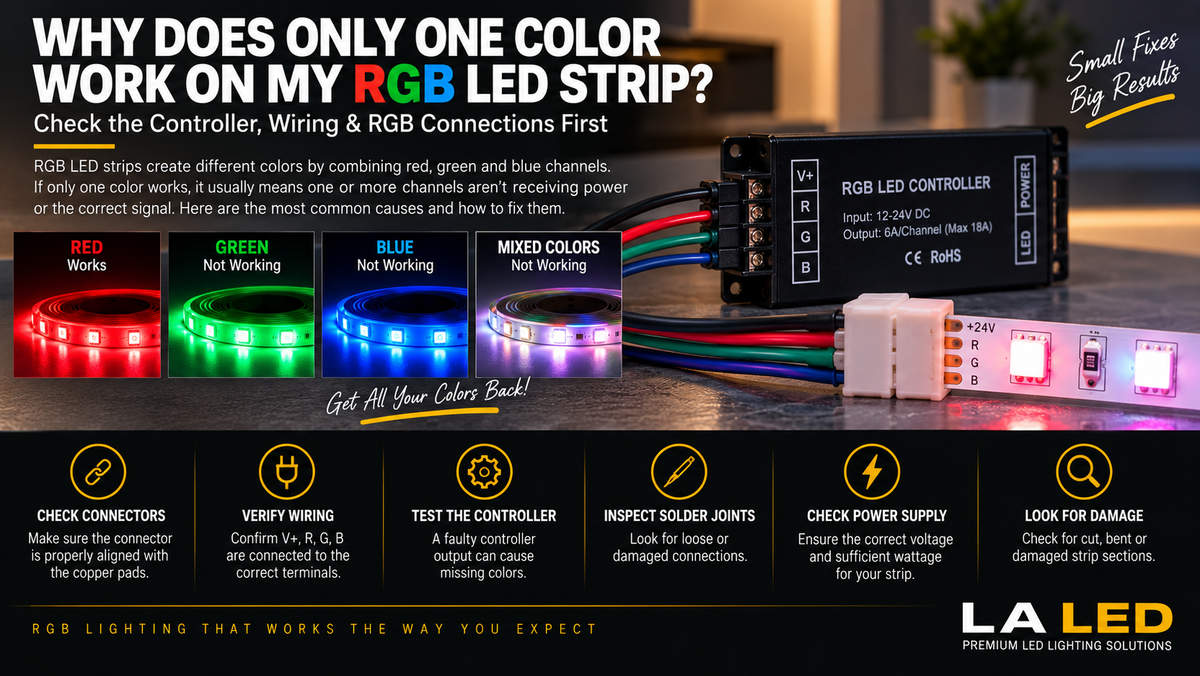
Why Does Only One Color Work on My RGB LED Strip?
You turn on your RGB LED strip and expect to see:
Red → Green → Blue → Purple → Yellow → White
But something is wrong.
Maybe the strip only lights up red.
Or green works, but blue doesn't.
Perhaps the remote changes modes, but the strip keeps displaying essentially the same color.
Does this mean the entire LED strip is bad?
Not necessarily.
RGB LED strips create different colors by controlling separate red, green, and blue channels. If one or more of those channels lose their electrical connection or control signal, the strip can lose certain colors while others continue working normally.
Common causes include:
- Loose wiring
- Misaligned connectors
- Damaged copper pads
- Controller problems
- Incorrect connections
- Broken solder joints
- Damaged LED strip sections
- Power or voltage issues
Understanding how RGB strips create colors makes troubleshooting much easier.
How Does an RGB LED Strip Create Colors?
A standard RGB LED strip contains three color channels:
R = Red
G = Green
B = Blue
The controller adjusts the intensity of these channels to produce additional colors.
For example:
Red + Green → Yellow
Red + Blue → Magenta/Purple
Green + Blue → Cyan
Red + Green + Blue → White-like mixed light
So if only the red channel is working, the strip cannot properly produce colors that require green or blue.
This is why a single failed connection can dramatically reduce the colors available from the strip.
Our RGB COB LED Strip (24V, 10mm) is a conventional three-channel analog RGB product, which is the type this article covers.
Why Would Only One RGB Channel Work?
The RGB strip itself may be receiving power correctly.
But the individual color channels also need proper electrical connections.
In many conventional RGB systems, you will find connections such as:
V+ / Common
R
G
B
If the common connection and red channel are working but green and blue aren't, the strip may still illuminate—but only red.
That immediately gives you a useful troubleshooting clue.
1. Check the RGB Connector First
If your installation uses a solderless RGB connector, start there.
RGB connectors need to align correctly with the strip's copper contact pads.
A connector can appear closed while one or more contacts are not actually making a reliable electrical connection.
For example:
+ → +
R → R
G → G
B → B
If the connector shifts sideways even slightly, perhaps only one channel makes contact.
The result could be:
Red works
Green doesn't
Blue doesn't
Before replacing anything, inspect the connector carefully.
2. Make Sure the Connector Isn't Misaligned
RGB strips have multiple copper pads positioned very close together.
If the strip isn't inserted straight into the connector, the metal contacts may land between pads.
This can produce strange behavior such as:
- Only one color works
- Two colors work
- Colors are incorrect
- Light changes when you move the connector
- Strip flickers when touched
If moving the connector causes the missing colors to appear temporarily, you probably have a connection problem.
3. Check the RGB Wiring
If the strip is hardwired rather than using a connector, inspect the individual conductors.
Depending on the product, wiring may include terminals marked:
+ / V+
R
G
B
Make sure each conductor is connected to the correct terminal at:
Controller → Wiring → LED Strip
A loose green or blue conductor can eliminate that color channel while red continues working.
4. Check for a Loose Wire
A wire doesn't have to be completely disconnected to cause problems.
A weak connection can behave intermittently.
For example:
Blue works → Stops → Works when wire moves → Stops again
This strongly suggests checking:
- Terminal screws
- Connectors
- Solder joints
- Wire splices
- Copper pads
Connections should be mechanically secure and electrically reliable.
5. The RGB Controller Could Be the Problem
The controller is responsible for switching and adjusting the individual RGB channels.
If one controller output fails, the strip may lose a specific color.
For example:
Controller Red Output → Working
Controller Green Output → Failed
Controller Blue Output → Failed
The strip could then appear permanently red even though the LED strip itself is functional.
This is why replacing the strip immediately isn't always the best first step. A compact three-channel unit such as the MiBoxer FUT037S RGB Controller is inexpensive enough to keep as a known-good spare for exactly this kind of substitution test.
6. Test Each Color Individually
Use your controller or remote to select:
Pure Red
then
Pure Green
then
Pure Blue
Write down what happens.
For example:
| Selected Color | Result |
|---|---|
| Red | Works |
| Green | Nothing |
| Blue | Nothing |
| White | Red only |
This pattern tells you that only the red channel is operating.
Another example:
| Selected Color | Result |
|---|---|
| Red | Works |
| Green | Works |
| Blue | Nothing |
| Purple | Red only |
| Cyan | Green only |
This strongly suggests that the blue channel isn't operating.
Testing primary colors individually makes troubleshooting much easier.
7. Why Does White Look Red, Green, or Blue?
RGB strips create a white-like color by combining:
Red + Green + Blue
If one or two channels are missing, the result won't look white.
For example, if only red works:
White command → Red
If red and green work but blue doesn't:
White command → Yellowish appearance
This doesn't necessarily mean the controller is selecting the wrong color.
It may simply be unable to activate one of the required channels.
It is worth noting that mixed RGB white is never as clean as a dedicated white LED. If white quality matters in your installation, an RGBW strip with a separate white channel is the better product choice.
8. Why Is Purple Showing as Red?
Purple generally requires:
Red + Blue
If the blue channel isn't working:
Red + Blue → should create purple
but instead:
Red + nothing → Red
So when mixed colors look wrong, test the primary channels separately.
The missing primary color often explains the entire problem.
9. Why Is Yellow Showing as Red?
Yellow is typically created by combining:
Red + Green
If the green channel isn't operating:
Red + Green → should create yellow
becomes:
Red + nothing → Red
Again, the issue may not be the preset color itself.
The green channel may simply be missing.
10. Inspect the Copper Pads
If the strip was recently:
- Cut
- Reconnected
- Extended
- Bent
- Installed in a connector
inspect the copper contact pads.
Look for:
- Scratches
- Torn pads
- Contamination
- Damaged traces
- Poor connector contact
- Incorrect cutting
A damaged copper pad can prevent one channel from receiving power.
11. Did You Cut the Strip at the Correct Location?
LED strips should only be cut at designated cut points.
If the strip is cut outside the specified location, you may damage the electrical traces.
That could result in:
- Missing colors
- Dead sections
- Intermittent operation
- Inability to reconnect the strip properly
Always look for the manufacturer's cut markings before cutting.
12. Check the Solder Joints
If your RGB strip uses soldered connections, inspect each joint.
A solder connection can appear attached while still making poor electrical contact.
Look for:
- Loose wires
- Cracked joints
- Broken conductors
- Bridged contacts
- Damaged copper pads
If the problem started after soldering or extending the strip, these connections deserve particular attention.
13. Is Only Part of the RGB Strip Showing the Wrong Color?
This is an important clue.
Suppose:
First 6 feet → All colors work
Next section → Only red works
In this situation, the main controller is less likely to be the problem because it is successfully controlling the earlier section.
The fault may be around:
- A cut point
- Connector
- Solder joint
- Damaged trace
- Damaged strip section
Find the exact location where the color behavior changes.
That point can help locate the fault.
14. What If the Entire Strip Only Shows One Color?
If the entire strip shows only one primary color, check components closer to the beginning of the system:
Controller
↓
Controller Output
↓
Main RGB Wiring
↓
First Strip Connection
↓
LED Strip
A fault before the strip can affect the entire installation.
15. Could the LED Strip Itself Be Damaged?
Yes.
RGB strips contain multiple electrical channels.
Physical or electrical damage can affect one channel while leaving another operational.
Possible causes include:
- Excessive bending
- Damaged PCB
- Incorrect voltage
- Short circuit
- Overheating
- Water damage
- Installation damage
- Damaged components
If the controller and connections test correctly but one channel remains dead, the strip itself may be damaged.
16. Don't Bend the Strip Too Sharply
Flexible LED strip doesn't mean infinitely flexible.
A sharp fold can damage:
- Copper traces
- Solder joints
- Components
- PCB
This is particularly important around corners.
Instead of creating a hard crease, use an appropriate:
- Corner connection
- Wire bridge
- Connector
- Installation method
depending on the strip design.
17. Check the Power Supply Voltage
The LED strip must receive the voltage for which it was designed.
For example:
24V RGB Strip → Compatible 24V Power Supply
12V RGB Strip → Compatible 12V Power Supply
Do not assume a higher-voltage supply is simply a more powerful version.
Incorrect voltage can cause improper operation or damage.
Always check the strip specifications. A selectable unit such as the 60W 5-in-1 Dimmable LED Driver (12V / 24V) can be set to match either type of strip.
18. Is the Power Supply Large Enough?
The power supply must also provide sufficient wattage for the complete installation.
Calculate:
Strip Wattage per Foot × Total Length = Approximate Load
For example:
If an RGB strip consumes:
4W/ft
and you install:
20 ft
then:
4 × 20 = 80W
The power supply needs appropriate capacity for the total load, following the manufacturer's requirements. For the 80W example above, a 100W driver is the minimum and a 150W unit leaves proper headroom.
An undersized supply can cause:
- Unstable operation
- Dimming
- Flickering
- Shutdown
- Color problems
19. Why Do Colors Change Toward the End of a Long RGB Strip?
If colors work correctly near the controller but look different farther down the strip, you may be dealing with voltage drop rather than a failed color channel.
For example:
Beginning → White
Middle → Slightly warm
End → Red/Pink
Different RGB channels may respond differently as voltage drops.
Long installations may require:
- Parallel feeds
- Power injection
- Proper wire sizing
- Shorter runs
- Different power distribution
Follow the strip manufacturer's maximum run recommendations. A multi-output transformer such as the 192W Dual-Channel or 288W Triple-Output lets you feed several shorter runs independently rather than chaining one long line.
20. Can a Bad Controller Make Colors Wrong?
Absolutely.
A controller can fail in several ways.
It might:
- Lose one channel
- Output the wrong channel
- Become intermittent
- Stop responding to the remote
- Produce unstable brightness
- Remain stuck on one color
If you have a known-compatible controller available, testing with it can help isolate the issue. Browse our LED strip controllers and remotes for a replacement matched to your strip type.
21. Could the Remote Be the Problem?
Sometimes.
If the remote isn't communicating correctly with the controller, commands may not behave as expected.
Check:
- Remote battery
- Pairing
- Controller response
- Signal range
However, if selecting red, green, and blue consistently produces the same physical color, the problem is more likely somewhere in the controller, wiring, or strip channels.
Where a remote has genuinely failed, matched sets avoid pairing problems—our MiBoxer RGBW Control Kit ships the FUT096 remote and FUT038S controller together.
22. What If the Colors Don't Match the Remote?
Suppose:
Press Red → Green appears
Press Green → Blue appears
Press Blue → Red appears
This often points to wiring order rather than failed LEDs.
The RGB conductors may be connected to the wrong controller terminals.
For example:
R wire → G terminal
G wire → B terminal
B wire → R terminal
Correct the channel mapping according to the product wiring diagram.
23. One Color Working vs. Wrong Colors
These are two different problems.
Only One Color Works
Likely causes include:
- Missing channel connection
- Failed controller output
- Damaged strip channel
- Connector issue
All Colors Work but Are Wrong
Likely causes include:
- Incorrect channel order
- Miswired controller
- Incorrect connector orientation
This distinction can save a lot of troubleshooting time.
24. RGB vs. RGBW Matters
Make sure you know which strip you actually have.
RGB
Uses:
Red + Green + Blue
Controlled by a three-channel unit such as the MiBoxer FUT037S.
RGBW
Adds a dedicated:
White
channel.
RGBW therefore requires a compatible controller and additional electrical connection—our RGBW COB Strip (12mm) needs the four-channel MiBoxer FUT038S rather than an RGB controller.
An RGB controller should not automatically be assumed compatible with an RGBW strip.
If you expect to run more than one strip type, the MiBoxer WL5 5-in-1 Controller handles single color, CCT, RGB, RGBW and RGB+CCT from one unit.
25. What About Addressable IC RGB Strips?
Addressable RGB strips are different from standard analog RGB strips.
They may use connections such as:
Power + Ground + Data
rather than separate R, G, and B power-control channels.
Troubleshooting can therefore involve:
- Data signal
- Controller protocol
- Data direction
- IC compatibility
- Power injection
- Controller configuration
Do not apply a standard 4-wire RGB troubleshooting method blindly to an addressable IC RGB strip.
First identify the type of strip you have. Our COB IC RGB Addressable Strip is this second type, and it requires an SPI controller such as the SP638E rather than any conventional RGB controller.
Simple RGB Troubleshooting Sequence
If only one color works, use this sequence.
Step 1 — Select Pure Red
Does it work?
Step 2 — Select Pure Green
Does it work?
Step 3 — Select Pure Blue
Does it work?
Step 4 — Inspect the Connector
Make sure all RGB contacts align with the copper pads.
Step 5 — Check Wiring
Verify:
V+ / R / G / B
according to the product diagram.
Step 6 — Inspect Cut Points and Solder Joints
Look for physical damage or poor connections.
Step 7 — Determine Whether the Problem Affects the Entire Strip
Entire strip → look toward controller/main wiring.
One section → look near the transition point.
Step 8 — Verify Voltage and Power Supply Capacity
Confirm the system is correctly powered. A 24V Plug-In Transformer is convenient for bench-testing a 24V strip without hardwiring.
Step 9 — Test the Controller
When safe and appropriate, test with a known-compatible controller.
Step 10 — Inspect the Strip
If everything upstream is correct, the strip channel itself may be damaged.
Quick Diagnostic Table
| Symptom | Likely Area to Check |
|---|---|
| Only red works | Green/blue channels, connector, controller |
| Only green works | Red/blue channels, connector, controller |
| Only blue works | Red/green channels, connector, controller |
| Purple appears red | Blue channel |
| Yellow appears red | Green channel |
| White appears yellow | Blue channel |
| Colors don't match remote | RGB wiring order |
| First section works normally | Connector/strip after that section |
| Entire strip has same problem | Controller/main wiring |
| Colors change toward end | Voltage drop/power distribution |
| Colors change when connector moves | Poor connector contact |
Should You Replace the LED Strip?
Not immediately.
Before replacing it, check:
Connector → Wiring → Controller → Power Supply → Strip
A $5 connection problem can look exactly like a failed LED strip.
If only one section of the installation is affected, replacing the entire system may be unnecessary.
Identify where the missing channel stops working first.
If the strip does turn out to be damaged, our RGB LED strip range is 24V and dotless, in 16.5ft, 32ft and 82ft reels.
How to Prevent RGB Color Problems
During installation:
- Match voltage correctly
- Use compatible controllers
- Use properly sized power supplies
- Align connectors carefully
- Match R/G/B terminals
- Cut only at designated points
- Avoid sharp bends
- Secure wiring properly
- Plan power injection for long runs
- Protect connections where required
- Test every color before completing the installation
On the first three points, match the controller to your strip's channel count and size the driver to the total load before ordering.
Most importantly:
Test the strip before permanently installing it.
Run:
Red → Green → Blue → White
before hiding the wiring or closing the installation.
Final Thoughts
So, why does only one color work on your RGB LED strip?
The most common causes are:
Loose Connection + Misaligned Connector + Wiring Problem + Controller Channel + Damaged Strip
Start by testing:
Red
Green
Blue
individually.
That immediately tells you which channels are working.
Then follow the signal path:
Power Supply → Controller → Wiring → Connector → RGB Strip
If the entire strip has the same missing colors, investigate the controller and main wiring first.
If the colors work normally until a particular point in the strip, inspect that section, connector, cut point, or PCB trace.
And if all three colors work but don't match the remote?
Check the R/G/B wiring order before replacing anything.
A systematic approach can often solve the problem without replacing the entire LED installation.
FAQ
Why does my RGB LED strip only show red?
The red channel may be the only channel receiving a proper connection or control signal. Check the green and blue wiring, connector contacts, controller outputs, and strip.
Why does my RGB strip show red when I select purple?
Purple requires red and blue. If the blue channel isn't working, the strip may display only red.
Why does white look yellow on my RGB strip?
RGB white uses red, green, and blue together. If the blue channel is missing, the remaining red and green can create a yellow appearance.
Why don't my RGB colors match the remote?
The R, G, and B wires may be connected to the wrong controller terminals. Check the channel order against the manufacturer's wiring diagram.
Can an RGB controller lose only one color channel?
Yes. A controller output can fail while other channels continue working.
Can a bad connector cause only one RGB color to work?
Yes. If only one or two connector contacts properly touch the strip's copper pads, some color channels may not operate.
Why do all colors work at the beginning of the strip but not at the end?
If the problem begins at a specific point, inspect the strip, connector, solder joint, or PCB traces near that location. If colors gradually shift over a long run, also investigate voltage drop.
Can low power cause RGB colors to look wrong?
Power-supply or voltage-drop problems can cause unstable operation and color changes, particularly on longer runs.
Is RGBW wired the same as RGB?
No. RGBW adds a dedicated white channel and requires a compatible controller and wiring configuration—see our RGBW strip range and the four-channel controllers that pair with it.
Is an addressable RGB strip the same as a normal RGB strip?
No. Addressable strips commonly use data-based control and require different troubleshooting procedures. Our addressable IC strip range pairs with SPI controllers, not conventional RGB units.