
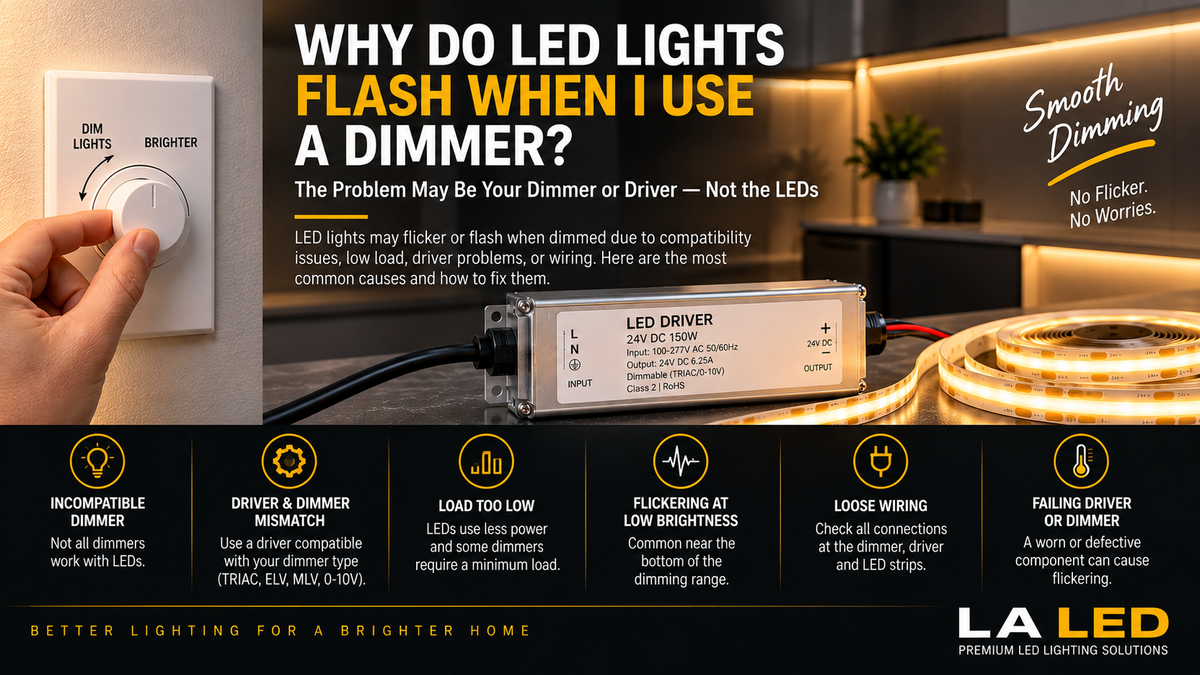
You install new LED lighting.
At full brightness, everything looks perfect.
Then you move the dimmer down and suddenly the lights begin to:
- Flicker
- Flash
- Pulse
- Shimmer
- Turn off unexpectedly
- Jump between brightness levels
This is one of the most common problems with dimmable LED lighting.
And surprisingly, the LED itself may be perfectly fine.
In many cases, the real problem is compatibility between the LED, driver, and dimmer.
To understand why, you first need to understand how LED dimming works.
LED Dimming Is Different from Traditional Lighting
Older incandescent and halogen lamps were relatively simple electrical loads.
Traditional dimmers could reduce their light output by modifying the AC power delivered to the lamp.
LED lighting is different.
LEDs require electronic circuitry to regulate the power they receive.
Depending on the system, this may include:
Dimmer → LED Driver → LED Light
For low-voltage COB strip lighting, for example:
120V AC → Compatible Dimmer → Dimmable LED Driver → 24V COB Strip
If these components aren't designed to work together, flickering can occur.
1. Your Dimmer May Not Be LED-Compatible
This is one of the first things to check.
Many older dimmers were designed primarily for:
- Incandescent bulbs
- Halogen bulbs
- Other traditional loads
They weren't necessarily designed for modern LED electronics.
An LED may still turn on when connected to an older dimmer, but that doesn't mean the combination will dim correctly.
Symptoms can include:
- Flickering
- Flashing
- Buzzing
- Limited dimming range
- Sudden shutoff
- LEDs staying slightly illuminated when off
If the problem started after replacing older lighting with LEDs while keeping the original dimmer, compatibility should be investigated.
2. The LED Driver and Dimmer May Be Incompatible
This is especially important with LED strip lighting.
A driver being labeled “dimmable” does not mean it works with every dimmer.
Different drivers may support different dimming methods, including:
- TRIAC
- Forward-phase
- Reverse-phase / ELV
- MLV
- 0–10V
- PWM or controller-based dimming
Some drivers support several methods, while others are designed for a specific control system.
If the dimmer and driver aren't compatible, the driver may not interpret the dimming signal correctly.
The result?
Flashing or flickering LEDs.
If you don't know which method your existing wall dimmer uses, a driver that accepts several removes the guesswork. Our 5-in-1 Dimmable LED Drivers accept TRIAC, ELV, MLV, 0–10V and PWM in one unit, so the dimmer no longer has to be matched to a single protocol.
3. The Load May Be Too Low for the Dimmer
This problem is easy to overlook.
Traditional dimmers were often designed to operate with relatively high electrical loads.
LEDs use much less power.
Imagine replacing:
5 × 60W incandescent bulbs = 300W
with:
5 × 9W LED lights = 45W
The new LED system consumes dramatically less power.
Some dimmers—particularly older designs—may not operate correctly when the connected load is below their required minimum.
This can result in unstable dimming.
Always check the dimmer manufacturer's specified LED load range.
4. Flickering Happens Only at Low Brightness
This is extremely common.
Your LEDs may work perfectly from:
100% → 50% → 25%
but start flickering near the bottom of the dimming range.
Why?
Every LED driver and dimmer combination has practical operating limits.
At very low settings, the driver may no longer receive or interpret the control signal in a stable way.
The lights may:
Flicker → Flash → Turn Off → Turn Back On
This doesn't necessarily mean the LEDs are defective.
Some drivers are specified for a wide stable load range rather than only near full output—our 60W Compact Dimmable Transformer (12V), for example, holds 0–100% dimming across a 20–100% load range.
5. Adjusting the Dimmer's Low-End Trim May Fix It
Many modern LED-compatible dimmers include a minimum brightness or low-end trim adjustment.
This lets you prevent the dimmer from entering the unstable portion of the LED's dimming range.
For example, suppose your LEDs operate smoothly down to approximately 10%, but begin flickering below that point.
Instead of allowing the dimmer to go lower, the trim can be configured so that the bottom of the user-accessible range corresponds to the lowest stable lighting level.
The exact procedure depends on the dimmer.
Follow the manufacturer's instructions.
6. The Driver May Be Overloaded
Dimmer compatibility isn't always the problem.
An overloaded LED driver can also produce unstable lighting.
For LED strip installations, calculate the total load.
For example:
LED strip wattage per foot × total length
If your COB strip uses:
4W per foot
and you install:
25 feet
then:
4W × 25 = 100W
A driver must be appropriately sized for that load.
A commonly used design approach is to provide additional capacity rather than continuously operating a driver at its absolute maximum, with the manufacturer's specifications taking priority. For the 100W example above, a 150W 5-in-1 Dimmable LED Driver leaves proper headroom, whereas a 100W unit would sit right at its ceiling.
An overloaded driver may:
- Flicker
- Overheat
- Shut down
- Restart
- Become unstable
7. The Driver Could Be Undersized
This is closely related to overload.
Suppose your LED installation requires approximately:
120W
but your driver is rated for:
96W
The driver simply isn't designed to supply the required load.
At full output or certain dimming levels, this can cause abnormal operation.
Before blaming the dimmer, calculate the complete LED load. A 120W system needs something in the 150W or 200W class, not a 96W unit pushed past its rating.
8. Loose Wiring Can Cause Flashing
A loose connection can create symptoms that look exactly like dimmer incompatibility.
Possible problem areas include:
- Dimmer terminals
- Driver input connections
- Driver output connections
- LED strip connectors
- Wire splices
- Controller terminals
If the electrical connection is intermittent, even small movement or temperature changes may cause flickering.
Loose electrical connections can also create a safety hazard.
Line-voltage wiring should be inspected by a qualified electrician when appropriate.
9. The LED Driver May Be Failing
If the system previously dimmed perfectly and suddenly begins flashing without any changes to the installation, the driver may deserve closer inspection.
Possible signs include:
- New flickering
- Random shutdown
- Excessive heat
- Buzzing
- Unstable brightness
- Failure to start
- Intermittent operation
However, flickering alone does not prove that the driver is bad.
Check compatibility, load, wiring, and controls first. If testing does point to the driver, our full range of LED drivers and transformers is organized by voltage, wattage and dimming type.
10. The Dimmer Could Be Failing
The driver isn't the only electronic component that can deteriorate.
A worn or defective dimmer may also cause:
- Flashing
- Unstable brightness
- Random changes
- Buzzing
- Poor low-end performance
If the lighting system worked properly for years and suddenly develops problems, both the dimmer and driver should be considered during troubleshooting.
11. Why Do LEDs Flash When First Turned On?
Some LED systems briefly flash when switched on.
Possible causes include:
- Dimmer electronics
- Driver startup behavior
- Incompatible controls
- Leakage current
- Wiring configuration
- Smart-control electronics
A brief startup behavior may differ from continuous flickering during normal operation.
If the flash is new, severe, or accompanied by other abnormal behavior, investigate the system rather than assuming it is normal.
12. Why Do LEDs Flicker Only at Certain Dimmer Levels?
This often points strongly toward a dimming compatibility issue.
For example:
100% → Stable
75% → Stable
50% → Stable
25% → Stable
10% → Flickering
The driver and dimmer may simply have an unstable operating region near the bottom of the range.
Adjusting low-end trim or using a better-matched dimmer/driver combination may solve the problem.
13. Why Do LEDs Flicker at Full Brightness?
If flickering continues even at maximum brightness, the issue may extend beyond low-end dimming compatibility.
Check:
- Driver capacity
- Wiring
- Connections
- Input voltage
- LED strip condition
- Driver condition
- Controller
- Dimmer compatibility
If the LEDs flicker even when the dimmer is effectively at full output, systematic troubleshooting is important.
14. What Is TRIAC Dimming?
TRIAC dimming is commonly associated with phase-cut AC dimming.
Rather than simply lowering voltage in a smooth linear way, the dimmer modifies portions of the AC waveform.
A compatible dimmable LED driver interprets that modified input and adjusts LED output accordingly.
If the driver isn't designed to work with the dimmer's method, performance may be poor.
That's why the words:
“Dimmable LED Driver”
alone don't tell you everything you need to know.
You need to know how it dims.
15. ELV vs. MLV vs. TRIAC
These terms can become confusing.
TRIAC / Phase-Cut
Common in residential wall-dimmer applications.
ELV
Electronic Low Voltage dimming is commonly associated with reverse-phase control and compatible electronic transformers/drivers.
MLV
Magnetic Low Voltage dimming is traditionally associated with magnetic transformers and appropriate forward-phase dimmers.
0–10V
Uses a separate low-voltage control signal and is widely used in commercial and architectural lighting.
The correct system depends on the specific driver and installation.
Never assume these dimming methods are interchangeable.
Our Compact Dimmable LED Transformers cover TRIAC, ELV and MLV for standard residential wall dimmers, while the 0–10V Dimmable LED Drivers add the separate control-signal method used in commercial work.
16. What About 5-in-1 Dimmable LED Drivers?
Some modern LED drivers are designed to support multiple dimming methods.
Depending on the specific model, a multi-mode driver may support combinations such as:
- TRIAC
- ELV
- MLV
- 0–10V
- Other control methods
This can provide much greater flexibility.
Our 5-in-1 range runs from the 30W through 100W and 300W models, all 12V/24V selectable with a junction box, and all supporting TRIAC, ELV, MLV, 0–10V and PWM.
However, even with a multi-mode driver, you should still verify compatibility with the actual dimmer and follow the manufacturer's wiring requirements.
17. Does COB LED Strip Flicker When Dimmed?
A quality COB strip can provide beautifully smooth dimmed lighting.
But COB technology by itself does not guarantee flicker-free dimming.
Dimming performance depends on the complete system:
COB Strip + Driver + Dimmer/Controller + Wiring
If any component is incompatible or incorrectly specified, even a high-quality COB strip can flicker.
Pairing a dimmable strip such as our Indoor Dotless COB LED Strip (8mm) with a flicker-free driver like the 80W 5-in-1 addresses two of those four components at once.
18. Can the LED Strip Cause the Problem?
Yes, although it may not be the first suspect.
Inspect the strip for:
- Damaged sections
- Poor solder joints
- Broken PCB
- Loose connectors
- Incorrect polarity
- Water damage
- Overheating
- Physical damage
If only one small section flickers while the rest of the installation is stable, the strip or connection may be more likely than the main dimmer.
19. Can Long LED Strip Runs Cause Flickering?
Long runs introduce additional electrical considerations.
As the installation becomes longer, you may encounter:
- Voltage drop
- Higher current
- Greater wiring losses
- Uneven brightness
Depending on the strip and installation, power injection or parallel feeds may be needed. A multi-output unit such as the 192W Dual-Channel 24V Transformer or the 288W Triple-Output version lets you feed several shorter runs independently instead of chaining one long line.
If the end of the strip becomes dimmer than the beginning, voltage drop is a particularly important suspect.
20. Can the Wrong Driver Voltage Cause Problems?
Absolutely.
The driver output must match the LED strip.
For example:
24V COB Strip → 24V Driver
12V COB Strip → 12V Driver
A higher voltage driver isn't simply a more powerful version of a lower-voltage driver.
Using the wrong voltage can result in improper operation or damage.
Always verify the strip and driver specifications before powering the system. A selectable unit such as the 60W 5-in-1 Dimmable LED Driver (12V / 24V) can be set to either output, which avoids ordering the wrong one.
How to Troubleshoot LED Flashing with a Dimmer
Instead of randomly replacing components, troubleshoot systematically.
Step 1 — Test at Full Brightness
Does the flickering disappear at 100%?
If yes, dimming compatibility becomes a stronger suspect.
Step 2 — Find the Flicker Point
Slowly lower the dimmer.
Determine approximately where flickering begins.
If the lights remain stable until very low brightness, low-end trim may help.
Step 3 — Verify the Dimmer
Check that the dimmer is intended for LED loads and compatible with the lighting system.
Step 4 — Verify the Driver
Confirm:
Voltage
Wattage
Dimming method
Load range
Step 5 — Calculate the LED Load
Make sure the driver isn't overloaded.
Step 6 — Inspect Connections
Check appropriate accessible connections for loose or damaged wiring.
Step 7 — Check the LED Strip
Inspect for damaged sections or poor connections.
Step 8 — Check Manufacturer Compatibility Information
Some manufacturers publish recommended dimmers or compatibility lists.
This can save significant troubleshooting time.
Quick Troubleshooting Table
| Symptom | Possible Cause |
|---|---|
| Flickers only at low brightness | Low-end dimming range / compatibility |
| Flickers at every level | Driver, dimmer, wiring, power, or load |
| Flashes when turned on | Startup/control compatibility |
| Buzzes while dimming | Dimmer/driver interaction |
| Turns off at low level | Minimum stable dimming limit |
| Randomly shuts down | Overload, overheating, driver issue |
| Only one section flickers | Strip, connector, or wiring issue |
| End of strip is unstable/dim | Voltage drop or wiring |
Can You Fix LED Flickering Without Replacing the Lights?
Very often, yes.
The LED fixture or COB strip may be completely functional.
Depending on the cause, the solution could be:
- Adjusting low-end trim
- Installing a compatible LED dimmer
- Using the correct dimmable driver
- Correcting driver sizing
- Repairing loose connections
- Reducing excessive load
- Improving long-run power distribution
That's why replacing the LED strip should not automatically be your first step.
Should You Replace the Dimmer or the Driver?
It depends on which component is incompatible.
If you have a quality dimmable driver but an old incandescent-only dimmer, replacing the dimmer may make sense.
If the wall dimmer is appropriate but the driver doesn't support that dimming method, the driver may need to change.
The goal is not simply to buy a “better” component.
The goal is:
Compatible Dimmer + Compatible Driver + Correct LED Load
There is also a third option: remove the external dimmer from the equation. Our CCT LED Drivers with Built-in Dimmer handle brightness and color temperature from the driver itself and work with a standard 3-way switch, so no dimmer/driver protocol has to be matched at all.
How to Prevent Flickering Before Installation
The easiest flickering problem to fix is the one you prevent.
Before purchasing your lighting system:
1. Choose the LED strip or fixture.
2. Determine its voltage and total wattage.
3. Select the appropriate driver.
4. Verify the driver's dimming method.
5. Select a compatible dimmer or controller.
6. Confirm minimum and maximum load requirements.
7. Plan wiring and power distribution.
Treat the lighting system as a complete package instead of choosing every component separately. Every product page in our drivers and transformers range lists output voltage, wattage, dimming methods and load range, which covers steps 3, 4 and 6.
Final Thoughts
So, why do LED lights flash when you use a dimmer?
The most common reasons include:
- Incompatible dimmer
- Incompatible LED driver
- Low dimmer load
- Unstable low-end dimming
- Incorrect driver sizing
- Loose wiring
- Driver problems
- Dimmer problems
- Voltage drop
- Incorrect system voltage
The key point is:
Flickering does not automatically mean your LED lights are bad.
In many cases, the LEDs are simply revealing a compatibility problem somewhere else in the system.
For smooth, reliable dimming, make sure your:
LED + Driver + Dimmer + Wiring
are designed to work together.
FAQ
Why do my LED lights flicker only when I dim them?
The dimmer and LED driver may not be fully compatible, or the system may become unstable below its minimum practical dimming level.
Why do my LEDs flicker at the lowest dimmer setting?
This commonly occurs when the system reaches its minimum stable operating range. Adjusting the dimmer's low-end trim may help if the dimmer provides that feature.
Can an old dimmer make LED lights flicker?
Yes. Some older dimmers were designed primarily for incandescent or halogen loads and may not operate properly with modern LEDs.
Can a bad LED driver cause flickering?
Yes. A failing or unstable driver can cause flickering, but dimmer compatibility, wiring, load, and other factors should also be checked.
Do COB LED strips flicker when dimmed?
They can if the driver or dimmer is incompatible. COB construction itself does not guarantee flicker-free dimming.
Can an overloaded LED driver cause flashing?
Yes. An overloaded driver may become unstable, overheat, shut down, or cycle on and off.
Why do my LED lights turn off before the dimmer reaches zero?
The LED driver may have reached its minimum stable dimming level. Adjusting the low-end trim or using a better-matched dimmer/driver combination may improve performance.
Will changing to an LED-compatible dimmer stop flickering?
It may, particularly when an incompatible dimmer is the cause. However, the LED driver must also support the appropriate dimming method. A 5-in-1 dimmable driver supports TRIAC, ELV, MLV, 0–10V and PWM, which removes protocol mismatch as a variable.